This Tutorial will help you in adding a Facebook Like Button For Blogger. Facebook has come up with a new set of Social plugins which enable you to provide engaging social experiences to your users with just a line of HTML. The Facebook Like Button is One of them. You can see a demo of the like button on this page. The Facebook like button will allow your readers to quickly share your posts with their Facebook Friends. You can also get to know how many people liked your Blog Post .This tutorial will teach you to add a Facebook Like button for Blogger
How to Add the Facebook Like Button Below every Post
1. First Generate the Facebook code using the options below. (Code will be updated with these details)
2. Copy the Above code. Login to your Blogger Account and go to Template > Edit HTML
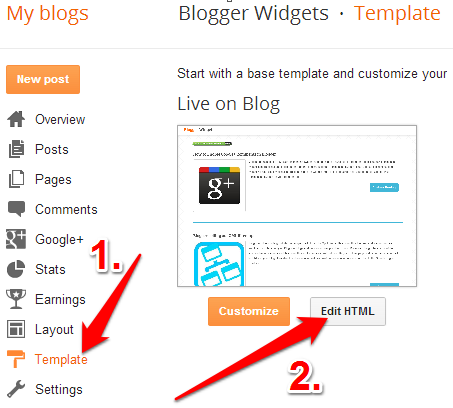
Click somewhere within the Template Editor and press Ctrl + F to search within the template.
3. Search for <data:post.body/> and immediately below that code, place the copied code.

If you find multiple occurrences of <data:post.body/> , do the same for each of them
4.Next you have to add the fb namespace to your template tag.Your template should have the specification for the fb tag that you have used. The following namespace declaration will take care of that. To declare the namespace, find
<html
and change it to
The following screenshot will help you out.
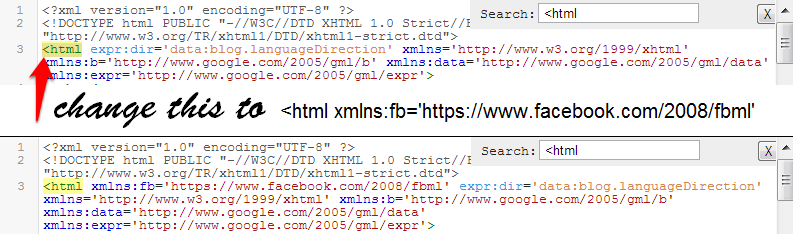 This is necessary for all FBML widgets using the fb tag. So if you have already added the namespace while adding some other FB plugin, then you can skip this.
4. Now Save the template and you should see the Like Button near each of your posts. You are done :)
Do you feel that the Like Button is boring and not so likable? - Then checkout the Facebook Like box, a styled version of the Like Button which would definitely bring you more “Likes” Also Check out :
If you liked this post, then consider “Like” ing it :)
Permalink : Facebook Like / Recommend Button For Blogger
This is the best information I have gotten all day. This would be a great feature to add to my blog. Thanks :)
the blue background sucks
I like it, but i hope it can be synchronized to the popular post widget.
@Christian Schnitt - you cant change the blue background, but FB offers some color schemes for hover effects.
hey dude i have added that code but i am unable to see like button on my posts.
Nice widget. This is so far i looking for.Thanks
@Tanveer - where have you added the code? if you didn't remove the two red lines, then the like button will appear on post pages only..
In my blog it doesn't show the numbers of "likes". In your blog you can see the number of likes only recently. The Facebook's plugin has not yet been fully localized?
Thanks
Ernesto
@parsifal - it shows old likes as well. :) See the number of likes on this post facebook-share-count-button-blogger.html . I think it only counts unique likes. may be this post was shared multiple times by same users.
Thanks for another sparkling tutorial. I'm always amazed that you come out with them so quickly.
Talent!
Its something that i want bt nt how i want it but still it does the job, doesnt it? Thanx man. If you got the time you can check out my blog
Not sure what I'm doing wrong, but I don't see the Like button anywhere? I thought I added it where you said?
this is great.. thanks to share this widget
Since I have a Posterous blog and Posterous automatically gives you a Facebook Like button, I decided I wanted one on each of my Blogger blogs. This is the best version I've found so far. Those two red lines (the "if" clause) made all the difference, since if I don't include them the main page of each blog becomes unloadable. (I have enough trouble loading 20 retweet buttons already...) On a single post, the page loads just fine with both the Retweet and Like buttons.
Great!
wow, there it is now! it's beautiful. It's just getting better and better. Aneesh, thank you again =)
This is EASILY the best and most worthwhile information on how to add this widget to blogger ANYWHERE. None of the other site tutorials work as well as yours...GREAT JOB!
thanks alot but my numbers of "like" always show as 1 if you're not logged in... wondering why...
anyways atleast it works
thx alot
I've done what you said, but still is not working for me. I think I did it right? Any ideas what I could try?
Hugs,
Gina
I like it. Good work Aneesh. I am looking around this code. Fqcebook also changed their Become a Fan with Like button in Fan Page widget :)
I got the iframe version working? Is it possible to get this working in a similar fashion using the Javascript SDK?
Much better than an iframe in my opinion. I tried making changes myself but couldn't get the post url to show up in a similar fashion, would only show that I recommended the site name without the post name added on.
amazing!! its only counts unique rite??..
Thanks for the info!
I have successfully installed the button, but it seems like the "Likes" count is incorrect. I have tried liking a post from several accounts, and it always appear as only 1 like.
Any idea how to solve this?
This was interesting and I can see my own "likes". On Facebook some friends have said they're likes don't stay. I'm wondering why. For example, I can only see I've been here.
had the same problem as Ilan
Update to my previous comment. I've figured out the javascript version which does require the javascript SDK found
Instead, your code would look like this:
ditto. count is wrong.
Thank you!!! Kudos... I tried to do this on my own for a good while before waking from my coma and using Google to find this page - thanks again!
Another great tip. It works just fine on my blog. I like it and I'll definitely share this post. Thanks a lot Aneesh. You really rock the blogosphere!
wow, very nice widget, I use this in my blog, thx aneesh :D
i have the wrong count, too. it shows 2 names (and no count) when i am logged in, and "1 person likes this" when i am not logged in. don't know how that happens. if anyone has any idea, i would be glad to get some help....
Nice post thanx........
I'm having similar "count" problems. I know for certain that at least 3 people have clicked on my Like button. If I set the button style to Standard, it says "Sean and Pam both like this." Previous to me clicking on it, it said "Kristin and Pam both like this." (No counts in either case.) If I set the style to button_count, the count shows as 1. It seems totally unreliable at this point.
Anyone know what might be going on?
nice info, i try it to my blog, and works, but doesn't work for add comment like facebook share, i found on other web, if i click "Like" it can be i like and can add comment for share, why code at here can't work like that ?
thanks before
@Aneesh: Hey thank you Aneesh, actually in my blog there are 2 code same i added that code in the first one that's y it was not displaying.
Thank You for your help!
same counter problem :(
I have tried it both ways with and without red lines and nothing shows up. I was so excited about this. Maybe I am doing something wrong? Can you help?
Thanks for information.
I added to my blog but what I want is share this information to my followers in my language. I made a good post about that but there is something left. which is the code. I cant add code to my blog post. How can I add this?
Thank you Aneesh for the tip. It works great. One more thing. Replacing the value of ''show_faces=false' with 'show_faces=true' will result in pictures of those who 'liked' being shown below as thumbnails. It looks pretty. Did you forgot to mention that, or is there any issue while doing it?
@Manuel - intentionally left it as i felt that it would look too complicated for a Like widget :)
there are no issues in adding it. you might also need to adjust the height and width appropriately to accomodate the faces :)
Love your button...thanks for the information. Could you help me though customize the padding around the button? It is smushed up against my body text and I would like a bit more spacing in between.
I don't know how to add code with "iframe"...I keep getting errors.
Thanks!
Forget my previous comment.
I just want you to look this page;
Look what happened to Like button. :))
How can I fix this?
I Like It , Thank you so much ! This is the greatest blog!
For those of you who say it doesn't work... it does! It only posts to your post pages, not the homepage. So click on your title in your blog post and then you should see it.
Thanks for the great widget!
Too bad it doesn't show in the facebook news feed when people 'like' your blog post... It's on their profile, but it doesn't really help you get exposure if it's not in the news feed. :-(
thank you
Help! Im dying to have it on my blog but unfortunately it doesn't work for my blog. Pasted the code just after . Nothing. Any suggestions?
Yu are Awesome!
thank yu.
@SirEvo - i don't see any probs with your like button.
@Karen Wells - can you show me a page on your blog which has that button?
@JPK - if you add the code, then you should see the like button below your post on each of your post pages. It won't appear on your homepage unless you remove the 2 lines of code in red, as i had mentioned in the post.
There is no problem now. I fixed it with adding a <p command before the command you gave, and after it. Thanx anyway. :))
thank u very much for your nice widget
Hey this works great but under my like button on blogspot is a free space of maybe 4 cm on my screen. like he leaves out some space to the next post like empty lines where nothing is written. why could this be?
THX for the help
does any1 know how to delete this space unde the button?
I want to have button exactly above the time. I'd be glad if any1 will help
Thank you! I had trouble following other instructions but your tutorial was spot on and super easy to use!
I'm facing a problem. I got the facebook like button under each post in my blog. However when I click on the like button, it gives me an error message saying:
The page could not be reached.
This is my blog
Help please!
i dont no..
ohh thank you for the amazing widget.. like it... ;)
Hi, my Like button works fine, but it doesn't show how many people have liked it if they're not your friends on Facebook. Help, please!
Wonderful, this is great article.
i Like This Article
awesome.awesome.awesome =) great !!
btw i.was.also.wondering , when.i. incorporated this.html, I realised.i.am.only.able.to.see.the.names.of
the latest 2 people, who.likes.it
The.rest.just.appares.as "and 2 other person likes this"
is.there.a.way.to.show.the.name?
here is a counting problem can't be fixed!
if you add "Like" and "Share" Button at the same blog, the count no. of this 2 buttom will always became the same!
e.g if there are "0 like" and "0 share" in one same post, when you push "like", then will become "1 like" and "0 share". however, when you reload this page, it will became "1 like" and "1 share", even there were no one sharing it.
anyone know how to fix it? thanks!
One related question. Not sure if you know the answer, or if there is an answer. But here goes:
I used this code (thank you) and people are clicking it. But it tells me "John Doe and two other people liked this". How do I find out who the two other people are?
Anyway, excellent site.
First thank you! I'm glad that Blogger is helping us folks out. These instructions are far better than anything you get from Facebook.
I have one question. Is it possible to get the "be the first" part in white instead of black? Not too legible on my site with a dark background. Maybe I'll just copy it and upload it the image to sites and see if that works instead.
Thanks again.
I Like It , Thank you so much !
Hey great post- thanks! I like the LIKE button under each post, but I'd also like to have a LIKE button in my header- so if people want to just simple like the site in general. Where in my Blogger HTML template would I put your code? Thanks man.
Brilliant! Thanks so much!
thank u for sharing! really good post!
Aneesh. When I added the like button (without red text) my blog updated but now I cant see any of my posts they just vanished. Even when I go to each post page, they arent there I can only see the right sidebar shifted all the way left and thats it...Hope you can help,
Aneesh...I tried adding the code and it disconfigured my entire template. I cant see my posts. Not sure what happened or how to fix it and would love some help. Cheers,
S
Aneesh Fixed it...had to upload my template and do it again. Just a quick question: How do I get the Like App to appear inside the post footer? Hope you can help,
S
I like this widget, and recommended to share good post. thank's so much...
Thanks, it works on my blog beautifully...
Thank you :)
Wonderful Aneesh! Just added to my blog and it works perfectly. Thank you again. :D
I have one doubt though. I've added the top commentators widget, and suddenly it shows less comments from the top commentators. I chose the smaller version (up to 500 comments). I don't think anyone deleted a past comment. It's weird... Someone who had 13 comments now has 10. Do you have any idea of might be happening?
works like a charm! thanks!
Yay!! I did it!! :)
Thanks for explaining this so well!
Thank you! It's work great on my blog :)
Great post ...
another great tools, keep up the good work :) and thanks
it's amazing..
Hi Aneesh,
Wondering whether you can help me. I have succesfully installed the button across my blog - but everytime I like a post myself and refresh the page immediately, it has always added one or two more likes. Seems that this cannot hold true - that every time I click like, one or two other people have done this at the same time as well. Note, that my blog is not one that draws much traffic yet.
Would appreciate your help.
This is great help, very clear. I "like" this post! Thanks :)
After trying and trying again, Ive managed to put this widget up with photos as suggested by Manuel and changed the height to 100, works like a charm Not experienced any issues with the count as yet, but then again no one has visitied it since I put it on...
James James
Oh and I just lurv this site...thanks for the share.
i want to try to my blog.
i have it's work...thanks
((Be the first of your friends to like this)) .. how to remove that or change color to white,becouse my blogger is also dark .. pls help :(
This is great and easy to do. Thanks.
Thanks VM for this!
Hi!
I just have a problem on my WS. I put the button on it, but it appears just after the text and not after the comment line, how can i resolve it?
Thx a lot
Chinoise.
So where do I put it when I have my own personalised theme and I can't access the 'expand widget' thing?
will try it!!
hi... i use a custom template, and i cannot find in the template.
can you help me?
Great post!!
Well I need a little help of yours, with this code, I have a blog, for some reasons its being reported as abusive, so the Like button doesn't serve its purpose for me. The url works perfectly fine over facebook so I have used 2nd code in my blog to solve this problem, but the thing is it is just posting out the same link as Like on user profiles, I want to get the adjusted code using so that each n every like button gets its proper title and url as the 1st code works.
Few things to mention
The above url works pretty fine through this link
Is there any way to modify the like code, so it may accept my website without abuse error.
Thanks in advance. :)
I have a question--I can get this button to work on my blog; however, you're supposed to have the capability of a "ghost" admin page through which you can send updates to your "likers":
How do you enable this feature in Blogger? There doesn't appear to be any "admin" link like appears in the Wordpress widget in the above link.
Thanks.
This is great - thank you!
How can I create more "air" between the like button and my blogpost?
i like this tutorial
i really like this and i put it in a different way with other sharing options
thanks. it works. but can somebody help me..
how to put spaces between the post and the like button?
I really like this and I used this in my blog bazicsnewsfeeds dot co dot cc
Why not be?please help me..
how to solve problem with reduce counting value ?
yestarday 've got 67 person, today 've got only 15.
i've not be changing code of site at all.
i like this tutorial
thx. i will tray in my blog :)
Great Article !! I have changed my facebook sharing Button..Thanks Aneesh
This is awesome. Thanks for showing us how to add the Facebook like button! Your directions are clear and easy to follow. I can't wait to read more of your blog!
thnkyou!!!!
Thanks for sharing this. Now I know how to put LIKE THIS BUTTON on my blogs here at blogspot :)
The best tutorial on how to set up the like button. I tried a couple of other tutorials but they didn't work on my blog
I am SOOOOO thanking you right now.
Jewelriver said...
I'm facing a problem. I got the facebook like button under each post in my blog. However when I click on the like button, it gives me an error message saying:
The page at could not be reached.
This is my blog's
Help please!
I'm having this same problem! Here is my blog
Layout > Edit HTML, Expand Widget Templates, and do not exist in my blog on Blogger, so I can not do this...
It was a great article but
I am getting error messages at my blog
How can I fix this? Anyone can help me?
good job..thanks for your post!
I get an error msg when i click on the like button of mt like button.
pls gve me a solution.
Great plugin! I just installed in my 2 blogs..
thanks!
IT WORKS...but only when I make a new post :(. It won't automatically add the LIKE button to all my other posts. Unless I go back and make a minor edit to a certain post let's say. My biggest problem is keeping it there. For some reason, it'll show up ONLY the first time I publish a new post, but when I log out and then log back in, it won't show. :^.
Also, I didn't know it could show how many LIKES your post has generated. That's REALLY COOL, if i could just figure it out now though. lol
It works...but only when I make a new post. It won't automatically add the LIKE button to all my other posts. Unless I go back and make a minor edit to a certain post let's say. My biggest problem is keeping it there. For some reason, it'll show up ONLY the first time I publish a new post, but when I log out and then log back in, it won't show. :^.
Also, I didn't know it could show how many LIKES your post has generated. That's REALLY COOL, if i could just figure it out now though. lol
Hey there... nice post, and thank you. Quick question...
I can get the button showing on my posts, it can also track the number of "likes" etc... but for some reason, it's not showing up on peoples' profiles when they hit it. Am I missing something?
really nice....thnx a lot...
Hi, I added the code, however when you hit the "Like" button the below error message appears;
The page at could not be reached.
Here is the blog url if that helps
Thank you in advance for your help, -Eric
Hey, Great job it seems to work on the blog i'm setting up but it doesn't show up in facebook. Click like, it says it works on the site but nothing happens on the facebook profile or homepage.
:(
Love it-->thank you so much!
I keep trying to ad this...but it doesn't show anywhere...I just added the share all thingy does that have to do with it? I want to use a like button maybeinstead of the star rating...
hi all, I need some help with this plugin.
I have copied all code with the red line into my blog. so, basically, it appears on any of my new entry. Im very happy with this.
For this "LIKE" button, the purpose of it is share it with your friends on FACEBOOK. However, it doesnt seem like to work for me. When I tried to "LIKE" other blog, my facebook "Recent activities" will update instantly which say that I like xxxxx . But it doesnt work when I like my own post.
Anyone can help me out with this? :(
Thanks
Thanks for the plugin! it was working well until a few days ago.
Now I get some problems: either there is an error (impossible to reach the page) or it seems to be ok but there is no post on users' profiles.
Please, what happens?
I think it's a Facebook temporary issue...ANY new like button, with any new article posted in these hours on various platforms doesn't work while the old ones do..!
Hi, thanks for your guide ^^ I've already tried others too. Come by once in a while
Let me rerun the instruction for those who still might be lost out there:
There are 2 options with this,
If you want the like button to only appear on your single post pages copy the whole code including the red highlighted bits and paste them after the tag within the code found in Edit HTML Menu inside the Layout Tab after clicking customize on your blog's homepage. Note that without clicking on the small box labelled Expand Widget Templates this tag will be nowhere to be found... so click it first.
If you want the like button to appear after every post on your home page copy the code WITHOUT highlighting the red bits top and bottom and paste in the same way as explained above then click on Save Template and viola it should appear as you want it to...
It doesn't really work for me. When I "like" my post, it won't update on my facebook while it does work when I "like" other people post.
Anyone plz?
Works like charm. Thanks!
Angela,
Thanks so much for helping me out! I had tried everything. Even going back and redoing it. Sometimes it amazes me how simple things can be, if only you knew what to look for! Thanks again!
Hugs,
gina
Thank you thank you!
cool brother hahaha
Very nice. Thanks
Awesome. Thanks. I used it for both my sites and I'm not seeing any problems with it whatsoever.
Than you so much for your great information. Very generous on your part. I wasn't even aware of such possibility. I will definitely add it to my blogger blog for my FB friends' perusal.
thaaaanks alot
arfff lol
why on earth isn't this working for me? It just won't appear on my posts...I wonder if my footer customizations are messing with it? How would I put it in the footer? Ack! Thanks.
How can I change the Url what appears on facebook when someone likes my blog?
Now when someone likes my post, in their facebook stream it will show as "Person likes.
Instead I would want it to show my blogs name and blog posts name and nothing more.
thanks coz I still learn in blogginh, thank you so much
Finnaly got it to work! Thanks. Struggled to find the right place to put it. But I think I got it now.
THANKS!
Nice tip well explained, tried it, and it worked, great job!!
OMG I Love you :d thanks tons !!! :D
Thank you so much for this tutorial!!
This is fantastic! Thanks.
i had remove the two lines of red coloured codes but blogger told me that there's some error with the code. help me please :(
check out the like button on here. Good things to like. makes me laugh :D
Intresting use of the like button though.
check it out
nice... thanks
Wonderful blog post and made my life smooth :) Thanks a ton. Worked for my site.
Thanks for the facebook like button, i am looking for it from 5 days.
Thanks!!!!
Thanks for the information. The button seems to be working properly for our site but the problem is, I can't see a list or face thumbnail of the people that "like" the post if I'm not friends with them. Any way to see this?
Is it supposed to show the names of the facebook users who hit the like button? I think mine does and I don't want it to. Thanks
Thank you so much!. this is what ive been looking for! =D
dood..
can please check for me? mine isnt really work out :(
thanks
regards,
gordon
For those of you looking to add some spacing between the like button and the text above, add a "margin-top" code after the height and width pixels - for example: width: 450px; height: 40px; margin-top: 1.5em'/>
thanx a lot's...
Works perfectly on our blog. Thanks a lot for this widget!
i can't see the like button in my blog....
why can't i put this to my blog??? im using this template
© Blogger templates Artsy
thanks....
Every time I add something such as the like button to my blog, it starts to look more and more like a big-boy blog. Thanks!
Thanks.
Thank you so much! Great, easy to follow tutorial! Happy 4th!
Very Cool! I tried it and it worked! Thanks!
Hi - I tried to add this to both my blogs.
- image didn't appear. I even tried to sign out and sign back in. Nothing is happening.
- I'm getting this message. Can't figure out what I did wrong. It looks like the elements are closed to me. Also I highlighted it in red so I could correct it easily but it didn't work.
Would anyone have time to look at what I did?
I meant to add this to my message
This is the message I got in blogger:
Your template could not be parsed as it is not well-formed. Please make sure all XML elements are closed properly.
XML error message: Open quote is expected for attribute "{1}" associated with an element type "allowTransparency".
Could it be because I'm using a LeeLou Blog template?
thnx for this great work.but my doubt i want to add like button on footer of my post.If i add your code then like button only diaplay on main post and if i click on read more then it will not display.so please help me.
check below i have added your code
@dev - you should have edited the code and changed the = with != . otherwise it would display on the post page only.
How can you see who liked it instead of just seeing 3 ppl liked it?
Celebrity Gossip
Yeah it's not working for me, I'm basically a noob in all this stuff, I had my template patched by Disqus so I couldn't find where to add the Facebook line. Need help, if you want I can upload my template.
Thank you so much, it works perfectly!
Mate I just found your site. You are doing awesome work.
Works great, thanks so much!
I wish this worked. I did everything step by step and still no button.
Works perfectly! Thanks so much
Natalie
thank you!!!
I Love u. i was searching this from days and finally i am done here after a long search for the Like button. i really liked it and thank u very very very very much. i am very happy to see the like button on my blog love u so much my dear friend.
PHEW! Took me forever to find the right spot but once I did this worked like magic! So easy! thanks so much
really nice...thanx
i got a problem with my blog, becoz my background is blue. so the text 'xxxxx people like this' couldn't seen. any solution? thanks
Doesn't Work for our site?! Any suggestions?
It works perfect!
:D
Thank you thank you thank! So easy, so nice. You're A-MAZE-za za zing!
So this doesn't work for people who use the classic template and code their own site? Because "Expand Widget Template" does not exit.
it doesn't work on classic templates, do anyone of u have a code that's working on classic template... im desperate now coz the one i used for my classic template doesn't work properly, instead of saying : you like (post title) on it says : you like <$blogitempermalinkURL$>
can some1 help me :( ? thanks...
Wow... Thanks for sharing this...
Good luck :)
Thnks worked like a charm
Aneesh/Manuel,
I've tried changing the Show_faces=false to true so that I can find out who 'LIked' my post. It only shows 1 profile though - the first one who clicked the Like button. Is there any way to display all? Or at least get a list of profiles who liked your post?
For reference, my blog
Thank you for sharing! I think I've figured out the answer to my question earlier. FB profile pictures of those who 'liked' your blog will not show up if: 1) you are not logged on to your FB account, AND 2) they are not your friends in FB.
So far, I only see pictures of my friends in FB who 'liked' my posts.
Anyway, I wanted to say that this has really been helpful...and so has your whole blog! I've written a post on my blog that mentions your blog
Cheers,
Rhea
nice.. i love this tutorial..
hey i have got iframe and xfbml code from facebook but where to paste it and how? please help
This is great! It's very funny and useful!
It makes my blog interactive connected to facebook!
not working at my blog
This is by far the best place for blogger tech advice. Just wanted to say, even for a non-techie, this is really easy to follow. LOVE IT!
doesnt work
Thanks a lot.
It's working perfectly on my site.
Worked on the first try, thanks!!!
Thanks! :)
Is there anyway to move it to a different spot on your blog? It's popped itself right in the middle of my blog links on pretty much every post.