How Does This Work
Blogger has introduced something called jump breaks. This will help you in creating the summary. What is a jump break? - Jump break is a special tag which can be inserted anywhere in a post using the post editor.When you have inserted a jump break into a post, the portion of the post above(or before) the jump break will serve as the summary of the post. This means that only this smaller portion will be displayed on Non-post pages.How to insert a jump break?
If you are using the New Advanced Post Editor, then you can insert the jump break easily from the post editor's Compose mode.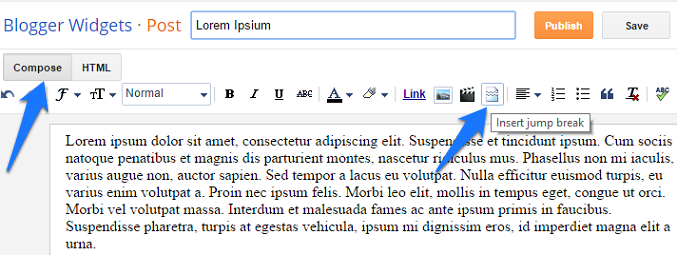
<b:if cond='data:post.hasJumpLink'>
                                                    <div class='jump-link'>
                                                    <a expr:href='data:post.url + "#more"'><data:post.jumpText/></a>
                                                    </div>
</b:if>
If this code is not present in your template,then add this code before
<div class='post-footer'>Now it should work properly.. If it doesn't,then leave a comment here and i will try to help you out..
Changing the Read More Text
By default the read more link text is Read more » . You can change this to whatever you like. To do that, Go to Blogger Layout page and click on the Edit link on the Blog Posts Widget.
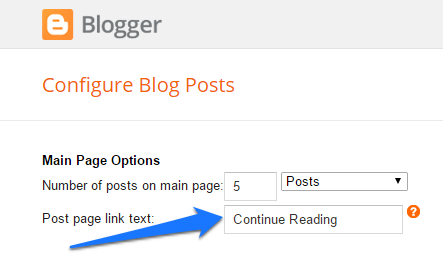
Change the Post Page Link Text and Save the Settings..
Drawbacks of the New Feature
For the post summaries to work effectively, you have to edit each of your posts and add the jump link in each of them. Blogger wont generate summaries automatically.:(Permalink:Post Summaries on Blogger With Read More
sweet! just what I've been curious about as my posts seem to multiply in length, thanks for this!!
THX for this "hack" ;) this code is FTW !!
Hey, thanks for this breaking news for the long awaited, and much wanted feature. Just tested with my blog, and it seems to work just fine.
It was really crazy to manage with the other span "fullpost" hack, because when re-editing the post, that span section was gone (at least with my firefox/chrome), and every change to post meant adding that section again. Good riddance!
thanks for info.. keep blogging
This is really a cool Widget added by Blogger
:)
I use this in my already hacked blog, just fine work perfectly without alter the previous hack. and non need to add extra code. A very cool hack here.
Hi, Aneesh.
Thanks for the code trick. The Read More link appears perfectly on my blog now.
Nothing works on my templates. I did the update the editor but the icon for the jump break didn't appear. So I did the step by step written here for the old editor but it still didn't work. What should I do? Thanks.
a small step but miles to go...........
Hoping you can help me here. I have the "Link Within" widget on my blog. When I follow the instructions and use the advanced editor to create a break, it works fine, however, the link itself is being placed AFTER the Link Within widget. So no one is going to see it, I didn't even see it until I searched for it. I understand HTML but all the widgets confuse me a bit. I tried to move it, but without success, I obviously didn't grab all the code I needed. If you are willing to take a peek, I put it on one of my older posts so as not to confuse current visitors.
look at the first post, Classic Banana Bundt Cake. The "read more" link should be after the photo and first paragraph. However, you'll see that the link appears after the Link Within widget (the link reads: click for recipe and more photos >>)
Thank you if you can help!
I'm not sure if my last comment went through, but I figured it out, so never mind! :)
@Amanda,
ok :)
@1987 ,
which blog di you try it on?
Wow I totally screwed up my blog and just managed to get it back to normal. Phew! I will have to try this again later. I think my Link Within widget is still giving me a hard time.
@Amanda
What probs do you have now? i can try to help..
Try my widget Related Posts with Thumbnails for Blogger :P
btw why are you using the popup comment form? and why not an embedded one?
thanks for info... keep blogging
hello, i just made read more like this and it this work properly.But i have problem with my home page.Please help me about this.
i forget, my blog is
in your template try deleting the opening and closing div tags of the jump link..
i mean
<div class='jump-link'>
and the
</div> immediately after that..
hello aneesh,
i already try your sugestion but not solved my problem.My home page still problem.You can see it when you open my blog.
Any sugestion about this?Thanks before.
@Franky,
can i have a look at your template?
@Franky its actually a problem with the blogger post editor.It allows you to put the jump break anywhere in the post.
When you insert a jump break in the post,the part of the post after the jump break gets truncated. In your posts,there are some opening div tags before the jump break and some of these are closed after the jumpbreak. So when blogger truncates the part of the post after the jump break,the closing div gets missing. Thats why the sidebar shifts to the bottom.
So in order to solve this you should take some care in inserting the jump break.The jump break shouldn't be inserted into open tags..
For example something like this shouldn't happpen
<div>
This is the short summary
<!-- more -->
This is the rest of the post
</div>
As it is clear from this code, the jump break is inserted into an open div tag and the div is closed after the jump break.This should not happen.You should insert jump breaks after closing the div tag..
So this should look like
<div>
This is the short summary
</div>
<!-- more -->
This is the rest of the post
I hope that the blogger post editor will soon show warnings when the jumpbreak is inserted into open tags.
hi there !!
Thanks for posting code.
New comer at blogger era.
I applied the above code but didn't activate.
Please look forward for problem.
Waiting
Webmaster
RE: Hoping you can help me here. I have the "Link Within" widget on my blog. When I follow the instructions and use the advanced editor to create a break, it works fine, however, the link itself is being placed AFTER the Link Within widget.
I too have Amanda's problem. Please help! thanks.
Thanks M8 Working Fine For My Blog
Thanks for the tip, but no matter what I do the "read more" link never shows up. My post is truncated but there is nothing else.
I'm using a non-default theme so when i do jump break, the Read More sign doesn't show on the page, rendering it useless. Do you have any tips for me?
@NarsBars,@Eylem Caner ,
Did you try adding the codes mentioned here?
excellent code, thanks dude!
Aneesh im having the exact same problems as @NarsBars,@Eylem Caner.
I re-read this page a few times and added the codes as suggested.
If you look under the popping pills post you see the issue at hand.
@Dustin ,
is the code mentioned here present in your template? If yes can i have a look at your template.?
Yes, sure go on ahead. Thanks!
Changed my name, any luck Aneesh?
Before this feature, I used the span fullpost code and it works fine with me.
I tried upgrading to the new advanced post editor and gave the jump break a try but somehow, after removing the Post Template I have, I'm seeing to jump links in my post.
Two Click here to continue reading appears after my summary.
Now, I reverted to the old post editor and re-instated my post template.
in my above blog the read more >> does not appear on the posts!!
asas são para voar,
para ver tudo de cima"
para transpor o UNIVERSO
I tried the feature and it made my side bar appear at the bottom of my page instead. So I tried to remove the feature, before searching as to why it happens, and still my side bar is at the bottom at my page. Now I'm just clueless and desperate as to how to get my layout back to normal :( Please help.
Note: I've removed the HTML code
Many thanks!
@Alesia ,
the sidebar goes down when you insert the jump break within an open div. You have to place it out of that.. It will get fixed if you place the jump link properly.
Hello!
'Jump breaks'doesn't works for me. I am with the older lay-out from blogspot, but I have brought up with the date publisher in 'configurations'. What can I do to have 'post summaires'?
Many thanks!
Hanna
Thank you for your tip but please how to change the text "Read more..." with a picture?
Music from Everywhere
it didnt work properly for me despite i found the code this my blog to see my template. plz help me
thanx so much i resolve my problem and all i owe to u thanx again
THANK YOU! I was having the issue w/ the sidebar moving to the bottom of the page and kept reading all these fixes about closing the div tag but your instructions were the first to specify it was the div tag in the POST! Not in my templates code! Thank you thank you thank you!!!
@Bekah
thanks a lot for the appreciation.. :) have a super day :)
i have the right code but don't work for me
Please help me
I would really like to use this feature in blogspot...but when I do, the left hand side of my page is pushed to the bottom....
the code is inserted in my template.....
@Phoenix Aquua,
the solution to your problem is already there in the post. just read it :) .The sidebar goes down because you in some posts you have insterted the jump break into open tags.. So when you insert jump breaks into posts , keep these things in mind.
Hi,
My "Read More" jump line also comes after my Link Within widget. I tried your suggestions, but that code is already present in my template. How can I get the Link Within widget to go AFTER the jump line? Thanks!!
Thanks!! I was lookin for this hints for so long =D
its not working for me... please help, add me on msn thank you.
I too am having issues with the "Read More" jump line occuring after my Link Within widget. I'm too naive with HTML to solve this as when I looked through the template code the LinkWithin widget tags occur well after the jump link code.
Hallo, this is perfect, I just upgraded my blog with all gadgets! You do not know for how long I was looking for them.
I think have the same problem with the READ MORE. It just doesn´t appear after the short summary on my blog. Where could be the problem? It makes me the summery but without the link: "read more".
Pls can you give me some advices?
THX!
thank Its help
Can anyone post on how they solved with the "Read More" link not appearing?
I have the summary working also but no read more link. I inserted the code before "div class='post-footer'" but nothing changed.
Thanks
Hi! If you're facing the dilemma of having your 'Read More' link shifted below the LinkWithin widget and would like to have them reversed, check my article here: for the solution. Hope this helps!
hi aneesh
I need one help in Html . I am trying it from many months but i am not able to do. Plz i need your help. this is maild id.plz tell me at what time your online. This looks foolish but i cant explain here. Plz tell me when u r Online.
Great post... BUT I cannot get it to work. I have the code as you listed, but it does not work in the post. Any ideas? Also i would love to have the BUTTON type you have for CONTINUE READING. Any help would be MUCH appreciated.
Thanks a million. I tried millions of methods to make the ReadMore link appear on my customised template. It just wouldn't work. I happened to stumble upon this blog and it made my day. Thanks a lot
Thanks......
Now I still use manual ReadMore which I must put ReadMore script in the text that I want to cut.
I will try it, hope this can facilitate & help me.
The custom template I'm currently using does not have the post-footer code. I tried adding the page summary code in various different places of the html and tried previewing it in my testing entry(which has the correct jump-break code), however it doesn't seem to show up at all. Could you please help me? Thank you ^^
@Lis - did you expand the widget templates? if you still cant find it, then try adding it after <data:post.body/>
if you notice... the code doesn't have that in there either o_O It's a really weird way of coding(but I do notice that most of this type of coding is used when I take layouts...) I do plan to make use of this jump-break thing hence the struggling...
Hi Aneesh,
I only want the "read more" hack on selected posts (like a long story). But the "read more" link shows up in all my posts, including those where I Did not place the < span > script. Any way how to do this selectively?
I'm using the jump break, but my post footers are still showing up in the post summaries. I tried pasting the bit of code in your post above my post footer tag, but it only generates another "read more" link (so that there are 2 showing in the post summary) and STILL shows the post footer.
Please can you help me to fix this.
@Marisa - post footers are not a part of the blog post. The jump break has nothing to do with it. If you want to remove the post footer from non-post pages, then you will have to wrap the codes of the post footer within conditional tags like:
<b:if cond='data:blog.pageType == "item"'>
Post Foooter Codes
</b:if>
Aaaah that makes more sense! Thanks Aneesh - will try that.
@Aneesh - it works!! Thanks so much for your help. I've tried everything else and nothing worked. *doing a happy dance*
Hi there!,
I got it working perfetly, however i would like to have an image instead of text is this possible?
Cheers!
Wow. Just inserting the "jump break" worked fine. Thanks!
i had screwed up in my blog man... can u help me? i reli don't know what shud i do... thx
Thanks this worked for me just fine
Hi,
Yours was very uptodate, nice, precise and correct information.
I could change "read more" to my local language without any problem.
Thanks once again.
Hello,
My template is modified by Artisteer , i followed every step, but it doesn't work... can i get some Help please !
Great!!!! This is lovely
Hello...
could you please tell me how to change the size of my after the jump link? And is it also possible to install it so that it comes out automatically after a certain amount of words? I've only seen that...
thanks in adcance...
best regards,
Vicky
Could you please answer on my blog > otherwise I can't see your answer...
@ViCreative - theblondsalad is using an old JavaScript method to display the summary but it is not automatic and needs you to wrap the rest of the post in a special span class. So its better to use your method of adding the Jump link.Its simple and more efficient.By the wat to keep track of comments, you have a "Subscribe by Email" option below the comment box. :). btw there is an old automatic post summaries hack(automatic-post-summaries-for-blogger.html) but i would suggest you to continue using the Blogger Jump Breaks
It's not working for my template :(
Could you check it?
hey, if it's working on my blog
My question is, how to change the "read more" text to a read more button, like yours
regards
hi, it doesnt work on my blog, all the codes seem to be in
can you have a look at my coding?
tried everything you suggested, and others have suggested. still can't make it happen. my posts display the before and after text, with a gap between. what am i missing? thanks!
what is the best way for me to pull visitors
my blog? guidance helped me .. I need some tips. I write the blog because they want to look for a little spending money in hemodialysis patients with kidney.
i can't see div class='post-footer'.
i try paste after
div class='main-cap-bottom cap-bottom'
Error: Invalid data reference post.hasJumpLink: No dictionary named: 'post' in: ['blog']
Please help me!.
Pliz,,,any one tell me how to add the "continue reading" button in my every post...............pliz help me................
...and here I was looking for a hack when all I ever needed was there all along.
Thank you for this post!
OMG! this works! thank you soo much...i was dying already before i came here. woot!!!
Hi This works like a charm. thx a ton
Just want to know if I can change Read more font size or can make bold
some kind of text formation. kindly help
i have question how to setup jump break in Windows Live Writer? instead that im using now the old fashion one
span full post span..( cant put html tag but sure u know it )
please help
thanks in advance.
thank u.....initially i didn't know abt dis feature nd tried a lot of useless codes....but now it's solved
this is good but how will i apply read more option in previous post ?
I like your post.really, nice to know you, from putri-threelas
Wonderful... thanks and let me check it, if it works, and if i found that code inside...
Hurrraaaayyy I got it... \:d/
My friend it is not working. only showing jump at home page but not showing read more button. I am trying to fix this problem but unable to fix this.
I use it without "#more"... Links to not spoil
thanks a lot
I am trying to figure out how to show the full page (instead of a pre-scrolled page positioned after the break) after hitting read more, anyone know how?
I can't get it to work. I checked the template coding and it's there, but the page break only creates a gap in the post. Not sure what to do.
Thank you ... ya its working...
Hello, I opened my templates but can't find "div class='post-footer'" so that I can insert your code before it.
I find 'post-footer' once but nowhere near a div class.
Appreciate any advice with my blog:
thx admin
This really helped me as my website has a highly customized template and read more was not visible by default and i was searching on Google to fix it.Your post has solved the bug.Thanks for being informative.
Thanks You Really Helped Me Thanks Man
Thank You Very Much Bro! I Used Your Technique And Its Working!!
This Is My Link after i follow your advise.
By The Way, Thanks Again!
Thanks a lot
thanks!!!! it is sooooo helpful!!! otherwise I have to write a long long code!! :)))
The Read More link is not showing, even after entering the code above. The jump break works, but the read more link on the homepage is not showing... My template is the Magazine one, and I haven't changed anything. It is as Blogger provides to me, other than adding the code you mentioned here. What else can I do?
Nice.. I was searching for this for months... a nice "Hidden" feature...
Thanks
Hi.,
i have tried this but it shows me the following command.
The excerpt from the page will show up here. The reason we can't show text from your webpage is because the text depends on the query the user types.
Can you say me why this happens.
Thanks