Blogger has released an updated version of the Post Editor.This one has more features than the old post editor.Here is a screen shot of the new Post Editor,so that you can get an overview of what is new in this advanced post editor.
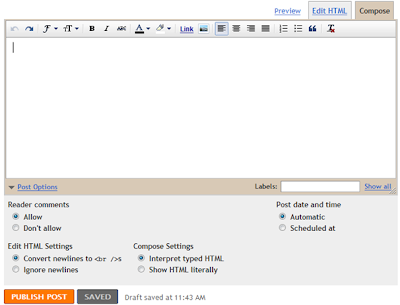
Some of the added Features in this new Editor are:
- Improved Image Handling
- Improved Raw HTML
- Geotagging
- Resize the Post Editor Vertically
- Easy Link Editing in Compose Mode
- Better Previews
- Draggable Placeholders
- A New Advanced ToolBar
How to Enable the New Post Editor
Go to the Settings Page, and under the global Settings, Opt for the Updated Editor and save the settings.
Further Reading: Blogger Help Center
when you say better previews do you mean it's gone back to the big preferable one, or it's the side of blogger in draft.
the new one/ blogger in draft is def great, but I wish they kept the old font colors. & The image resize for large tends to be s400, which is annoying & one has to go and manually edit it.
other than that it's pretty great!! and far improves!
it does'nt work! The german version comes without adding puictures button!
crap
elow puh sah laat ng gapcians..............
mg cumment aman kau......
I switched back to the old version.
Better image handling? I tried dragging pictures around a post like I could in the old version and it refuses to do it.
LEGAL
Hi,
Nice and good info for all blogger. thank's
cool
Gud post , i was searching for such a editor in blogspot.
Thanks. I made changes to my blog - after reading your info. Check out my blog and let me know.
I have activated the new Editor, but where's the 'Check Spelling' option on it? I seem to have lost that functionality.
I really like the new. Post editor. It's a lot more posting freindly.
What is this pls tell me
I am having trouble with zemanta loading on blogger. Any ideas on how to correct this?
Welcome and enjoy :)
Your web is very nice who designed it for you
Hello
I don't like the new edtor. It's harder to get images where I want them and I find that overall it is just much more difficult to use. I'm sticking ith the old one. I like it just fine and it has everything I need.
I agree with most of the comments, the old version is far better. I did switch to the new one and fought with it for a couple of weeks, then went back to the old version which I much prefer. It's easier, it does more; you loose several options with the new one...one of which is the ability to properly alt text photo's.
Sandy
I like the new editor, except there's no button for adding video. I always have to revert to the old version when I want to upload video.
Thanx my dear for this valuable info !
But me he dislikes
Wow! man you are a Genius! learned a lot of new things from you :)
Many Thanks! Cheers!
thanks man! :)
really good help for me! :)
Visit My blog :)
I hate the fact that I can't apply colors to my texts with the new editor. Still with the old one. =p
Please someone tell me how to schedule posts in advance on the new editor? I clicked on post options, selected the date and time and clicked publish post and it just posted it anyway. Please help. thank you.
multiple picture upload is not working for more than 5 pictures
Does someone know how to change the language of the spellchecker. I have only the german option and found no way to change it to english. I even would prefere to switch between several languages.
Is there a new comment system available for blogger as well? This one is rather spartan and the external comment systems are quite slow.
omg! thanks a lot! now i can make my blog more loveable!