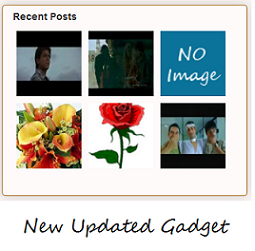
 This is an updated version of my Recent Posts Gadget.As the name suggests, this Gadget will help you to display the most Recent Posts on your Blog’s Sidebar. The Gadget has an options panel and can be configured to meet your needs. The Gadget inherits styles from your Blog. But you can override the colors if you want(this was done to support third party templates which doesn’t have the skin variables properly defined).
 Update : - For all those who complain that the Gadget doesn't work ,please please check out this new Recent Posts Widget
Gadget Settings
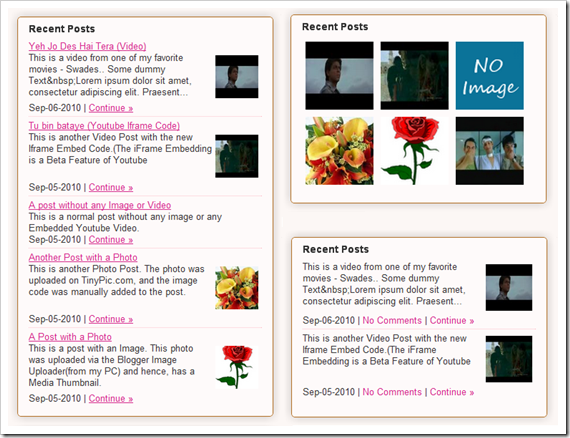
Some Previews of the Gadget with different configurations
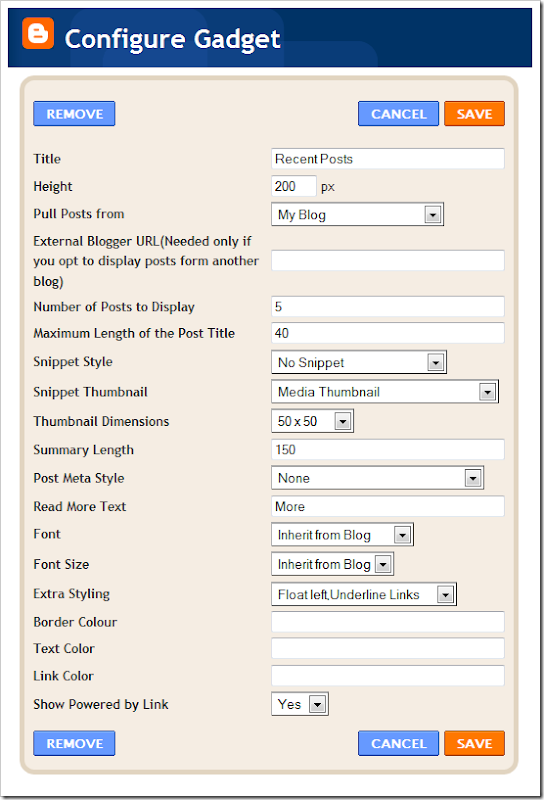
 About the Various Options
Pull Posts From - By default, the recent posts will be fetched from the blog to which you have added the gadget. If you want to fetch the posts from another Blogger Blog, then you can change this optionExternal Blogger URL - You need to fill out this field only if you are trying to pull posts from another blogger blog.
Maximum Length of Post Title - Your post titles can be too long. In that case you can limit the title to x number of characters using this parameter.
Snippet Style - You can display the snippet with Post Summary, Post Thumbnail , or both or none.
Snippet Thumbnail - When you upload photos from your PC to blogger using the Blogger Post Editor, Blogger generates a Media Thumbnail of size 72 X 72 px. If you add external images to your blog posts, then Media Thumbnails will be generated. If media thumbnails are not present, the post will be scanned for images or YouTube videos. You can specify which images to use by using this option. The No Image Thumb is a default image which will be used if post has no images or videos(you can turn this off) .
Note:- If you want to grab the images or YouTube thumbnails, then you should have “Site Feeds” set to Full. If you opt for the Media Thumbnail only, then the short feed will be used by default.
Thumbnail Dimensions - Size of the Thumbnail in pixels. The gadget doesn’t generate any Thumbnail. It just uses the media thumbnail,YouTube thumbnail , or any image in the post and scales it to the specified dimensions
Summary Length - If you have opted to display the post Summary, then you can control the length of the summary(in characters)
Post Meta Style - You can display the Post Date, Comment Count and a Read More Link.You can choose any combination of these three.
Font and Font Size- By Default, the container’s font and Font Size is inherited into the Gadget. But if you are using a 3rd party template, then these might not be properly inherited. In that case you can use this Option to over ride these parameters.
Extra Styling - Allows you to specify the position of the Thumbnail, and whether to underline the links or not.
Border Color - If your specify a border color, and if the posts need separation, then a dotted border will be applied between the posts. If you don’t specify a color or if you specify an invalid color, then the border wont be drawn. You can use Hex Color Codes(eg: #000000) or or normal colors (eg : red )
Link Color and Text Color - By default, the link and text colors will be inherited from the blog. But if you want to override this, then you can specify the color in any of the two formats.
Read More Text - This field was intentionally added to help blogs which are not written in English. Initially i used “More »” as the Read more text without taking any user Input. Seeing this on a non- English Blog is a little awkward. So i added this new field :)
Note : - Those who are using the older version of this gadget, please remove it and add the new one.
Add The Gadget to your Blog
Check out the Demo and Sample Configurations to see what the Gadget can do. |  |
wow great amazing recent post. I like the costumized with the thumbnail.
btw if I want to edit the css..? how come?
If you followed my Method 1,you cant edit the CSS..
If you want to modify the CSS according to your will,you will have to use method 2.. It will give you a HTML widget with the actual widget code.. you can add the css definitions there.. :)
I hope more of you will love this widget..
nice job, thanks for share... btw, how to create a manual (maybe method 3) :)
@choen if you use method 2, you can edit the css and modify the styles.. :)
Thanks buddy,
Found your site after trying many time to install the script. Yours one is the easiest and my blog download fastest compared with other script I already tried.
Great, Blogger has come up with widgets such as this one. :) They've been improving in terms of template/layout. Thanks for sharing the code. I'd try it out some time.
Can we take other URL in this widget ? [not our url ]
awesome widget! Big thx!
I found an error and does not accurately show the Google ads by clicking on the link widget! Are you able to fix it? thanks in advance
@sikumb@ng yes you can do that for now.. But i will probably remove the Blog url option and will use the current blog's url by default..
Great Brother. Always shocking me with your article :) I'll try it.
@Another Blogger thanks a lot bro..
thanks for the appreciation.. :)
It is a great gadget but doesn't show in IE 6 sp3
it works great on Firefox and opera
perhaps a modified version needed.
One final question:
if the server where the script is down what would be the alternative (such as having the script served within the blogger itself, so haw can we have the script and upload it to alternative places
PS: I won't install new versions of IE as they are buggy and bulky and hardly ever use it.
@daniella
actually my server has 100% uptime.. :) proud to be on hostgator.. :)
But still i will move the gadget to google code servers..So there won't be any downtime problems..
Actually i am already doing a mod for the gadget.I have removed the blogurl input and will fetch your url automatically..So may be some bugs would be fixed in the next update.
Thanks for notifying me about the IE6 error. I will try to solve it.. Btw i dont have IE6.. ;)
How do I change the title text color?
@jmw if you want to modify,install the widget using method 2 and modify the css to adjust the colors.. If you are using a highly modded template the colors may not go well using method 1..
hey friend.....it was a magnificent widget....Specially for a newbie like me...
But Its not showing thumbnail in my blog.....have a look at my blog and see what wrong....
Ur help will be greatly appreciated....
thanks
@Sameer Arshad
thumnails will be displayed only if you have added images to your blog post(via blogger upload)
If no image is present,the default image saying no thumbnail available will be shown..
this is awesome stuff your template looks sizzling..
@alok , thanks a lot.. really does it look good? :)
i am still modding it.. :) not complete..
Thumbnails for archive lists?
Thank you for this... just added it very easy to navigate! :)
@TheHorrorPress it looks really cool on your blog.. i was threatened by the pic though.. ;) he he
I tried using it but thmbnails didn't not appear..
nice widget but thumbnails won't show up on my page????
@Alexiel the images are taken from your feeds..(media thumbnails).. the feed will have media thumbnails only if you add images via blogger..If you use posts which reference external images(like tinypic or the likes),then they wont show up as media thumbnails in the feed and hence wont appear in the widget..
Whenever you add an image via blogger for a post,blogger will attach a small thumbnail version of that image to that post feed entry(wont be visible to you..its hidden in the feed.).This gadget utilizes that small image.. So if you don't use blogger upload,you cant have a thumbnail..
hope it is clear.. :)
Hi Aneesh, great widget. Especially for static homepage blogger template. I was just wondering if I could do the same for labels. Like add a label feed, example 'News Feed'
@David Bergeron yes that is possible.. that is how my home page works.. just add the widget using method 2 and replace your blog feed with your label feed
Great post. Any idea on how to implement this code for Blogger classic template ?
tx
@Anonymous
i am not familiar with the blogger classic template.. but if you can add some javascript to your classic template,and if classic templates also generate media feeds,then you can.. ;)
i will try to know about it and let you know if i find any info..
how about if we only want the thumbnails to show but WITHOUT any titles or descriptions. I tried to do that from a couple of tutorials i found online, but I filed miserably :/ any suggestions?
thanks in advance!
Cheers,
Ema
@aEmme all of the tutorials that you have seen are the ones using the full size images.. :)
Yes it is possible to modify it to display the images only.. But you will have to modify the javascript which powers this widget..
BTW this widget is now featured on the official blogger directory(on the Add Gadget page) along with 6 others(till now)
thanks a lot for the information! =)
and one last thing is the change that has to be made in the javascript too complicated for a begginer to do? i mean if it's something easy can you explain it to me..
just in case, lol :) but thanks again!
@laEmme
nope its not that easy to explain.. :)
but yea i can help you around,Just use this contact form and leave me your email there..
Contact Form
done =)
Hello Aneesh !
I've now installed your great widget. OK on Firefox : it bugs on IE !! Accessing to the second and else pages, the widget stop working ! (sorry for my bad english... hope you'll understand me;..). You can try to see what i meen by looking on my blog on IE... So desperate...
Can you help me ? Thanks by advance !
this is very cool. thanks. ..now my suggestion, first "recent post" listed might really be not the last one, but one before that .. :]
and I would really appreciate to have TOP POSTS widget too ... at the same style as this Recent Posts
i didn't understand the first suggestion.. ;)
i don't understand about "replace your blog feed with your label feed"
i used method 2 and in Blog url i used my feed like you show " name" I've changed that "yourblog with my blog addres" and " label name with my label", but it don't show anything. it just show teh title and powered by Blogger Widgets. how to use this widget with spesific label? thx
Hmm,ok do one thing..
Don't change any of the settings in the Widget installer and add it..
now edit the widget.you will find a url like If i change this then i can display all the posts that come under the labe Blogger Widgets(I replaced space with %20)
Now i think you can figure out what should be done..
Thx for the answer. but in one of my blog it still not showing my recent posting based on my label. in my other blog it's work. Please could you exam my blog, why that tricks doesn't work. this is my blog that doesn't work:
Thx
@wayanx
you made another mistake!!
The Label Name is News and not news
blogger feed urls are case sensitive!!
Thank you Aneesh. Now i know where is my mistake. You're the great support master of blogging i ever found. I wait for your new improvement.
Thanksssss alot.
is there anything widget that can be used for slideshow recent post based on category? i plan to built a newspaper blog and every time i look at another newspaper website we can see a headline of that day and showing by slide show.
@wayanx's
sorry i don't have any widget that does that..
Perhaps someday you could built that. right now i use the same widget from widgetbox, but there is a limit such as :
if we use free account we can't edit the title of the widget and sometime always showing their ads and i'm afraid that ads will make my blog is not very comfortable to those who read my blog
maybe you could built something like that in future
sory i fix my commen't
wayanx, that is a good idea. I've been searching for featured content slideshow that is automatically updated..
Aneesh, how can I put a limit on the characters in the title of the post? Do I have to edit the .js file?
@David Bergeron
yes you will have to.
Aneesh,you are amazing. will we get to see a recent comments gadget from you with similar features.?
and may be a top commentator widget with thumbnail pic of the top commentator?
Waiting for more and more gadgets from you
Can you help us on how to make this work with different labels as it only works with the homepage...Thanks
@Tinh ,
i didn't understand what you are trying to say!
Hi, again, I made as you guided ad it works with label as method 2 but one thing happens is that the arrow in front of each summary make the widget ugly. How can I remove that arrow to make it adjusted as your DEMO and the same with method 1? Thanks
See my second comment, disregard the first one as I got it done after reading through comments.
Here is the pics I got. I saw arrow that make the widgets ugly. How can i remove arrow and align the left side as it is in the method 1?
Tinh
@Tinh,
i am not good at CSS
but still that bullet will be gone if you chnage
.sidebar li, .sidebar1 li {
to
.sidebar li {
:P
There is no: .sidebar li, .sidebar1 li { in the code of nethod 2, please help
it is there in your template..
no, that is method 1 in blogger gadget and it does not work with label, 4 of gadgets are the same, I like the method 2 to use 4 different labels, that is what I mean
@Tinh
Goto blogger Layout >Edit HTML
you will see some
.sidebar li, .sidebar1 li {
its there for sure.. i can see it in Firefox >View Source
Yes, it works now, thanks much buddy. I will make an article to introduce this to my readers too
Is there a way that you can add this to a home page of a website that then when clicking on the link will take you to the article page. The recent posts will be updated every time the blog is updated.
e.g. the recent posts will sit and when the link is click will take you to the blog post
Any ideas?
I do like your other widgets and I will be using them shortly.
Thanks
Daniel
yest it is possible. install the widget using metod 2 and fill the installer with the url and install the widget
Now that widget willl be displayed on all pages To display it on home page only, search this blog for selective display and you will find what you need.. Here i assumed that your main domain also has a blogger blog..
hi, this is the first time i visit here, your blog is very interesting. i really like it.
Very easy to install, I used the Blogger gadget search. Then changed html to add more padding to the right side of the thumbnail. Thanks.
I have tried this widget every time I have created a new page - and it never works : the only images it displays are just black boxes . I had seen that Amanda on Blogger had also experienced the same thing . Why is that ?
@Mia ,
i have mentioned so many times that this widget will work with blogger uploaded images only(images uploaded from your computer to blogger via the post editor).It won't display thumbnails of images on photobucket or anything else like that.. :)
thumbnail isn't automatically grabbed... any fixes?
is it possible to change this to make video thumnails except photo ? thanks
Great widget, but when I install in and then click on one of the recent posts, it goes to the page but all the Google Adsense ads do not display? I have to refresh to see them...any idea why this happens. I would love to use this widget (and will give you credit for it), but because of the adsense issue makes it hard for me to use.
Can you help?
@Andy ,
this widget can't affect the adsense or anyother ads in any way.. BTW can i see your blog where this happens
i met the same problem as Andy. it happened when i implemented both this recent posts w/ thumbnails, and recent posts by Blogger Buster.
nothing happened when i set up these gadget tho, as i click any entry link on these gadgets, all of the Adsense Ads, except custom search ads, on the page have gone!
This problem happened only thru these gadgets.
@Lim ManFai,
yea both you and Andy where right.
But i don't think that either Amanda or me will be able to fix this.
Actually that script can in no way affect adsense ads.. These gadgets work like iframes which means they will act as some small external pages which are iframed into our blogger blog.
When someone clicks on a link in the gadget,the actual referrer is an external html page(something hosted on blogger with some peculiar complicated urls).. I think that adsense bots are not serving ads when referred from such pages..
I will report the same to some people in the blogger team..
BTW the only solution that i currently can provide is to use the widget version using Method 2 of this Post
Thanks for this gadget. blogger is becomming better day by day.Thanks to guys like you
Hi
the recent posts widget works perfectly for my blog except that when you follow the links to the posts itself, my adsense ads (which are inside the post body) dissappear. They were there before I installed the widget. I have the widget in my home page only. Thanks! Hope you can help me
Hi Aneesh,
Thanks very much for this great widget. I have a similar question to Petr Buben (August 4). I currently have the last 5 recent posts showing on my blog with the most recent post at the top, but this is a bit redundant, as the most recent post is already at the top of my blog. Ideally, what I would like to show are the last 5 recent posts AFTER the one showing at the top of the blog.
Example: if I have posted on 1 June, 2 June, 3 June, 4 June, 5 June and 6 June, the gadget currently shows the posts for 2-6 June, but I would like it to show 1-5 June. Hopefully, that makes sense.
Is it possible to easily edit the HTML to make that change?
Thanks for your time.
hi,
why the thumbnail is blank no image available ?
@Terence Chan,
i can't fix it. (this happens to all iframed blogger gadgets)..
Only the Blogger + Adsense team can solve this.
I have asked the blogger people to look into it.
BTW,you have another easy solution for this.. Use the widget method(Method 2) and there wont be any problems with adsense..
@The Swiss Rambler,
from your comment i guess that you want to display posts 2-6 instead of 1-5.. is it??Ypur comment confuses me.. :)
OR are you trying to tell that the latest post doesn't appear in the gadget.? This might be due to blogger cacheing which takes it some time to update the gadget content.
@bud,
if the particular recent post doesn't have an image in that post,then it will display a no image thumnail..
Hi
Recent Posts widget blogger is great. But I'm facing some problem. Some of my blogs are not showing up in the widget. The widget is blank. I don't know why this is happening.
Please try my blogs
(Shows Blank)
i don't see the widget on both of those blogs.. :( i can help you out if you have added it to the blogs and it isn't working..
Hi Aneesh,
Sorry for the confusion. I will try to make this clearer :-)
If today's date is June 6 (for example), the 5 most recent posts shown are:
June 6
June 5
June 4
June 3
June 2
However, as the latest post (June 6 in my example) is already at the top of the page, what I would prefer is the 5 recent posts shown to be:
June 5
June 4
June 3
June 2
June 1
In other words, not show a link to the post of June 6, as that is already easily viewable at the top of the page, but show the next 5 most recent posts.
Hopefully, that now makes sense.
hmmm got you .. so you want to display posts 2-6 instead of 1-5.. and sorry my bad.. you had clearly mentioned the same in the previous comment too :P
it is possible..Add the widget using method 2..you will be taken to a page where you can edit the widget content In the widget content find ?orderby=published and replace it with ?orderby=published&start-index=2
Aneesh,
Great, thank you. That works.
i Really like this..can you please modife it to show videotumbnails?? Please i need video thumbnails!!
thanks for this one.. i am using right now in my blog.
great widget..
Hi,
This is one of the most necessary widget that I was looking for. Thank you very much for coming up with this widget. I've also used the featured plug-in of this widget in blogger. But it's bit buggy. some of my blogs are not showing up. This code version is simply working great.
I've a small suggestion for this widget. Please include the option to open the links in current page or in a new window. That will be great.
Thanks once again for the widget
hi ..thanks for the widget. i installed first the one in blogger, but i have the same problems of everyone: cant custimse css and adsense non displayed.
But u know, it DO displayed thumbnails (even if a have my pics in flickr)
But i had to change the widget to yours, but now i have the problem of the list style, and thumbnails.
Do you think theres a solution for the thumbnails?? i mean, there must cus with other one it works.
And how can I disable the link list, without deleting the css of the sidebar ul il.
Please let me now anything i can do!!!!
@chobed ,
add the widget using method 2 and you can modify the CSS and won't have adsense incompatiablility
how to setup thumbnails?
its showing no Image available..
I think it shows the thumbnail only if we don't add html tag for the images..
thanx brother..
is there any way to show up thumbnails for embedded images (HTML tagged)?
:-)
stoped working with IE 8 yesterday
@ko ko ko ,
yea and yesterday it didn't work on Firefox also. i haven't changed any code at my part.. The blogger guys are fixing up their APIs.. So these gets problems..If you want an unaffected one,use the widget version using Method 2..It depends solely on my javascript and doesn't depend on the blogger gadget API
Hi,
It's still not working with method 2 T__T :( what do i do now :(
@mogo cafe ,
are feeds enabled on your blog..?Can i see your blog where it fails to work..?
I have used this blogger widget through the normal Blogger template (Add a Gadget), but the URL of each post is BLACK in the widget - I want to change the URL to a lighter color to match my template colors. How can I do that?
if you install it using method 2, you can customize it.. by default it will use the sidebar link color.
Hello Aneesh,
I just wonder if I could use this widget for specific label instead to the whole post inside my blog?
Any idea?
I'm using LightBox 2.04 in my template, but if I implement this gadget, the LightBox does not work in IE. In Firefox or Opera, LightBox and Recent Posts With Thumbnails works very well. If you have any tips...
Thank you very, very much!
Thanks!
I use methol 2, and a have a trouble: the Recent Post columb is don't show correct. I shoted a screenshot ( 2 red circles):
Can you help me? please!
my blog
Hi, today i found that it is completely not working if i embedde a Youtoube video in a post first. The complete content of the widget is missing. At the moment i put a picture first as a workaround... but maybe someone can fix it or five a hint.
Hi. This was such a help. Thank you. My "Recent Posts" looks better with marginalization now. Although... I don't think the ordinary bloke without the slightest idea of CSS editing would really be able to customize it to his liking. Such as the font type, color, margins, etc. I'm not an HTML expert, but I remember some things in computer class which got me through the rest of the process. LOL.
Anyway, I hope everyone gets it too.
Still, I'm following. Great Blog. =)
Question: I can only get my widget to display 25 posts. Is that the maximum?
Hi, I have added the widget, and I like, but it often does not work.
Right now it is set for 9 posts, at 528 px, but when it features, it only features the last post.
Often it does not feature at all, just leaving a big gap in the column; with the Internet Explorer, cannot find this page.
Also, it only works if you come to the blog, from the original blog url. As soon as you click to go to a particular story, or anyone who visits the blog, from a search engine, and lands on a particular post, cannot see the widget, they also get the 'internet explorer' sign.
Any advice? I really like the widget, but it looks really sloppy, when it does not show...
Thanks.
@Andrea Muhrrteyn ,
use the widget version(Method 2)
Aneesh,
I did so. But all i got from that was, without any blog posts:
Recent WwAwR Posts....
Powered by Blogger Widgets
Can't figure out why
@Andrea Muhrrteyn,
which blog did you try it on? can i see a demo of what you are talking off..
and have you enabled feeds on your blog?
Aneesh,
I tried it
Both version are up there right now. I will leave them there fore a bit, but of course if i can fixt htem, i need to remove them.
widget version one shows, soemtimes, but instead of 9 posts that it is set to, it only shows two, but it shows them nicely.
Widget version two, only shows like my previous comment says.
As far as i know my feed is enabled, cause the feed works for followers et al; unless you mean some specific action, beyond that.
Thanks.
@@Andrea Muhrrteyn
yea it shows the first two posts only.. and you are using the summary feeds.. i hadn't looked into it yet.. will let you know if i fix it.
Yeah, i don't know why it is only showing first two posts, cause for the past few months I have had it, and it showed all nine posts, when it showed (as i said sometimes it did not).
But when it does, it is a really nice gadget! Anyway, I will leave up the one with two posts, better than nothing, and maybe it fixes itself, or i wait for you to let me know.
thanks though.
thank you
can i have recent post widget for one label and only list of 20 post title?
if you can modify your widget for my requirement then please mail me.
@Anonymous,
the solution is already mentioned in my previous comments..
thanks.
Hi, I've implement your great widget using "method 2".
Now my question is this: as you can see on my blog - on the right column, I can't manage to have the post titles look right (I would like them aligned and without this "step" effect) and without bold font.
Could you help me or explain me where I have to modify your js file?
Thank you!
Nice job, it is very useful!
Is there any way to use only width parameter on img.recent_thumb stylesheet. This because the images would show better by specify only width, instead of width+height.
Thanks for share!
Is there any options where i can specify the BLOG URL while listing Recent Posts ?
Suppose if i have two blogs. A, B. In A, i want to list 5 recent blogs in B ?
Hope it's an interesting task to accomplish :p
Great job...Actually you provided the feature.....Excellent...Kudos to u dude :p
thank you very muck
Help! The advanced recent posts gadget is not working at this site:
I tried to solve it here: but to no avail
This is what it looks like:
Hello!
Method 1 Gadget Using the new Gadget API = Error
Sorry... i´m Spanish
Malina
@TATTOO its working fine here at my end . are you using firefox and are you using some adblocking addon or something like that?
and can't u see the demo widget here withing the post which lists my recent posts?
Hi,
Great plugin. I just needed one info. Does this plugin use RSS feeds? If so, can I change the RSS feed URL?
Thanks,
Suhas
Hi! What if i only want to show thumbils not header or whatever
how can i edit bcoz even i did remove everythin there still left header
i want to use it in photo blog so...
Hi,
Got the answer. Nevermind! How do I add a 'Next' Button to his widget.
Thanks,
Suhas
because when I click a recent article does not appear adsense advertising
but when you refresh the page to appear adsense advertising?
there are still errors. i don't know what happened on my site, help pls.
hello..im newbie in blogging and i loves your widget but recently i've change my layout and seems the color of the widget doesn't fits and hardly be read..i don't want to change my css font color and so i try to edit the widget coding by doing expand widget templates but i stuck seems i'm not pro in coding.can you helps me sir??
for suggestion, maybe you can put some layout customize option on this widget~
Hi Aneesh,
Are you aware that your wonderful gadget has stopped working for many people?
Here's the link to the Google Help forum discussing the issue:
Cheers.
Nice Hack.........
Such a pity that you gadget seems to have stopped working; I have had to remove it from my blog - any idea what the problem is and can it be rectified?
Cheers
I m using this widget and my adsense ads are being blocked when i open any link through this.
i am losing very much due to this issue. is there any solution for that
Thanks for your nice post! I like it. And I enjoy here.
really a nice job. thanks
Great gadget.
Great job Aneesh. I am having troubles in making thumbs apprear on the left and titles on the right, though. I tried modifying xml file and even js linked inside the xml file... without appreciable results. Could you give me suggestions or prepare a version like that (more usual with thumbs on the left, i think)?
Thank you in advance
Hi.. I have try this method on my blog but when I click on "recent post" link, my adsense is disappear, can you help me? :)
Hi Aneesh, it has been nice reading all your tutes and heads up to all your efforts. I have been searching on various places on how can i show only post pics in blogger homepage. Can i customize template to be as such. It should look like something. I need your help on this or else even a pointer where i can do this on my own will be appreciated.
I can only get 25 'recent posts' to appear on my blog. Is that the maximum? Can I get more than 25 to appear. (someone asked this earliler but I did not see an answer...)
Thanks
DAVID
Thanks, merci & muchas gracias,
useful widget, nice code,
nice idea to also put it in a post so we can copy the code to do same!
Thanks again!
ps:
seems some other do use your code and ad a "promo" link to their web, when you do it for free with no ad!
@Activista
thanks for the appreciation.. yea i know of them widgetsfor free and some others.. but don't know how to deal with them :)
this is great , already added to my blog, thx
Hi!
It's possible to make this with posts with videos, not with images?
Awesome gadget, Aneesh! Just stumbled on it a couple of days ago while doing an article on adding gadgets in blogger, installed it immediately and am so delighted with the result! Thanks a bunch!
God bless you for your generosity!
@Nuria Cortés - would try to add that feature when i get time.
@Jacquelin - thanks for the kind words. Only a few care to leave a comment unless they run into some troubles :)
I wish there were an option to have thumbnails only and make the thumbnails links to the posts. And also to make the thumbnails a little bigger. Anyone know of a way to make it do all that?
But it's a cool gadget anyway.
gread gadget.. thx 4 u.
i am trying this and other javascript ways on my blog for 2 days but i fail.. i have blank pages always and gives error.. i couldnt understand and solve the problem.. when i enter my blog adress it shows blank page on widget also.. how can i solve ths, could u help me pls?
uhh great theese..
thanks your this post....
Hi,
My recent post widget thumbnail photos look very blurry as I adjusted the size code to 151px from 55px. How can keep the size at 151 but make the pictures look super clear.
Hey Aneesh
Thanks for the gr8 widget. I was about to try the other widget from other blogger (not degrading his efforts and hard work) but this one seems to suit my blog.
Thanks again mate,
Keep up the good work
Hi Aneesh,
Thanks for the widget, super easy to install and looks really good :)
Kind regards,
Louma
I've finally found a recent post widget that I can get to look how I want (thanks to the css access in method 2), but two things; how do I stop the post summary from being in italics, and how do I resize the date, comment-count and 'more' font?
Thanks.
great widget. but i found a problem with the widget. when the link in the recent post is clicked the adsense ads are not displaying.
@Alex- yes you are right. This is a problem with all gadgets developed using the Gadget API. I had reported it to blogger but no solutions till now. The gadgets are rendered in iframes and when the page is reffered from such iframes adsense ads doesn't show up.
BTW, if you add the gadget using method 2, you wont have any such problem(as it is not made on the Gadget API)
thanks for the gadget. i love it
it's not working at this blog.. :(
janchetnaa dot blogspot dot com
this doesn't work with internet explorer. anyway to fix the bug?
Hey, this is a great widget, but there's a few things I'd like to customize:
Font size, picture size, picture placement (right of text, left of text, above/below text, cell size, etc.)
thanks for the widget!
ELo Designer said...
"this doesn't work with internet explorer. anyway to fix the bug?"
This is why I am here as well. Also, this should be made known to bloggers while a fix is in the works so they may choose another method and not lose page views!
Thanks!
@ELo Designer, Russ Bastable
Few blogs with multiple XML gadgets have problems in rederinng propely on IE. Add the widget using Method 2 and it wont have any problems.
@Russ Bastable,ELo Designer
This will be automatically fixed.. but will take time for the code to get updated(as it is cached). So if you need a quick fix change the url in the Gadget options.
Hi,
First of all, this gadget is very pretty and useful. But I have some problem when I use it. In Crome4 , appreance is very good. But, In IE7 and IE8 , appreance is "wavy", not one under the other. Finally, there is nothing shown in Firofox 3.6. If I couldn't explain the problem, please visit my blog
How can I fix these problems?
Thanks at advance,
regards
@gez-ye-ic - it displays properly in Firefox and Chrome. It appears wavy in IE if you don't opt for Post summarie. I will try to fix it and let you know..Till that you can use the post summaries if you want.. :)
Thank you very much for your quick responce. You are right, today it works properly in Firefox. I think , yesterday, there was something like a loading problem, or any way. I tried both at my computer and from adobe browserlab, yesterday. I couldn't use post summaries because of there is a sentence like "click for foto galllery" at begining of each post. so summaries are not nicely shown.
At the other hand, I think there is a limitation as 25 at number of posts to be displayed. I believe that just so beautiful gadget can be useable not only for recent posts, can be useable for "all posts" list.
Regards
Love this widget. But can you show me what the html looks like for this widget so I can go in and try to change to color and font? I have limited compurter knowledge but have changed other things in the template when I know where the specific code is.
thanks
Hi
Great site, I have used many of your tips on my blog.
I would like this widget, but only with a thumbnail. No text or description of title. Is that possible i have seen it on other websites. What can i do?
I want something like this....
where she has random images but it links to her post page. Do you know how to do that?
hahah thankz
Great, but is it possible same for related post. Tell me
I'm looking for something like that on Joudie's link too. What I'd like is a set of thumbnails of all the images I have in my blog. Some posts have no photos, some have more than one and some are from my flickr photostream.
I just want a collection of images that you can click on and it will take you to the corresponding post. Sorta like your followers section.
At this point I don't know if I want random photos or the first few and then you can click next or previous to see more.. if you know what i mean.
Your widget is nice by the way and thanks for sharing :-)
Hi, Aneesh, love the hack, but I have a question. If a post has no image, is there a way to remove the "No Image" graphic and show only the text? You can see your widget in action on my blog here. Thanks again for all of your super work. We'd all be so bland without you.
Glenn
Fantastic Widget!
But how do i change the Post Summary text from Italics to normal?
Hello ,
Thank you for the widget, it's great. Can we change the color? My background is black and all the text is hidden.
:(
@miss -V - Add the Widget using Method 2 and the color issues will get fixed.
hey check out my vertical scrolling recent post widget out here
Hello, I want to change title color because it's difficult to read. May you help me? :((
Is it possible to make the summary POST non-Italic??
Thank You Add the Widget using Method 2 and the color issues will get fixed
Hi,
Brilliant widget... really wan't to modify fonts and font colours, could you tell me how? I am a complete new-comer and really appreciate the help.
Ash
hahah thankz
How do I change the color of the widget? Here 's the font color black being the bottom of my blog is black. Then there's to see. is to help me?
@Vinícius,ajpmann,Rachel Weisz - add the widget using method 2.
I do love this widget. 2 requests for later versions:
1) The widget does not pick up my font/color settings for the sidebar, so I'm going to have to edit the html to make it work. Not the worst thing in the world, but it would have been nice not to have to do that. So either set the wigdet to use the blogger settings, or have a place where color/font can be set.
2) I love the preview thumbnails, but a lot of my posts do not have photos. I would have rather seen no thumbnail in those cases than a graphic that says "no thumbnail." (It takes up space unnecessarily.) I turned off this feature even though I love it.
But thank you. It is really great.
@One Cheer
1)add the widget using method 2 and colors will get fixed.
Hi Aneesh,
I posted before as appreance is "wavy" in IE7 and IE8. You have promised to fix this problem after my post, Will you solve this problem near future? Thanks again for your lovely widget.
Thanks for the widget. how to change the image size images next to the post (on umpolchaniyu 72 pixels)
mm.. not getting to add help...
how to change the natural size? (This srinshot code page)
please help me
please help how to change the natural size?
HOW CAN I CHANGE THE COLOR FONT TO MY RECENT POST CO'Z ITS BLACK & MY BACKGROUND TEMPLATE IS ALSO BLACK CAN YOU PLEASE HELP ME THANKS
Hi
Loaded your widget, but am getting only a window with Internet Explorer cannot display...." message.
Fix?
@aneesh
add this CSS
.jump-link a:hover{text-decoration:none;}
because the text add comment on hover shows underline.
great job!!!
I want to ask you if i can make a image link to the post. I mean by clicking the thumbnail image instead of the post title summary.
Is it possible??
I´m trying to edit the code but i don´t know how to do it.
please, i need some help. Thanks!
great job but when i trying to paste in html body
it shows plz close alt with ";"
whats the problem
thank's very much.. for the widget, i like it. is great..
thanks pal! it's a nice cool widget. I'll put it into my blog!
Hi Aneesh, I like widget, but it seems it does not work on my blog and I can't find out why? It doesn't even show the preview when I try to add the widget. :(
Is it possible to get only Thumbnail pictures as link to recent posts without any text around?
Thx
Wow!!! Cool widget! Works fine in my blog! :3 thanks!!!!!
Thanks for your nice post! I like it. And I enjoy here.
doesn't work with that blog
But it's a great idea !