Facebook has now officially introduced the Retweet like Facebook buttons for your blogs or sites. These Facebook buttons look much similar to the Retweet buttons by Tweetmeme. Facebook has 5 styles of Sharing buttons. Here we will see two of them.
Adding a Facebook share count button will show a neat count of how many times your blog post has been shared on Facebook.
Note: The Facebook share buttons are deprecated and FB no longer supports it(It still works though). You can still add it if you want. You can also opt to add the new Facebook Like Buttons with Like Count.
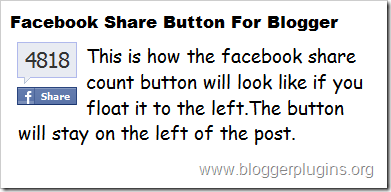
Facebook Share Button Style 1

Code for Facebook Share Button Style 1
<div style="float:right;padding:4px;">
<b:if cond='data:post.isFirstPost'>
<script>(function(d){
  var js, id = 'facebook-jssdk'; if (d.getElementById(id)) {return;}
  js = d.createElement('script'); js.id = id; js.async = true;
  js.src = "//connect.facebook.net/en_US/all.js#xfbml=1";
  d.getElementsByTagName('head')[0].appendChild(js);
}(document));</script>
</b:if>
<fb:share-button expr:href='data:post.url' type='box_count'/>
</div>
Facebook Share Button Style 2
Code for Facebook Share Button Style 2
<div style="float:left;padding:4px;">
<b:if cond='data:post.isFirstPost'>
<script>(function(d){
  var js, id = 'facebook-jssdk'; if (d.getElementById(id)) {return;}
  js = d.createElement('script'); js.id = id; js.async = true;
  js.src = "//connect.facebook.net/en_US/all.js#xfbml=1";
  d.getElementsByTagName('head')[0].appendChild(js);
}(document));</script>
</b:if>
<fb:share-button expr:href='data:post.url' type='box_count'/>
</div>
Facebook Share Button Compact Style 1

Code for Facebook Share Compact Button Style 1
<div style="float:right;padding:4px;">
<b:if cond='data:post.isFirstPost'>
<script>(function(d){
  var js, id = 'facebook-jssdk'; if (d.getElementById(id)) {return;}
  js = d.createElement('script'); js.id = id; js.async = true;
  js.src = "//connect.facebook.net/en_US/all.js#xfbml=1";
  d.getElementsByTagName('head')[0].appendChild(js);
}(document));</script>
</b:if>
<fb:share-button expr:href='data:post.url' type='button_count'/>
</div>
Facebook Share Button Compact Style 2
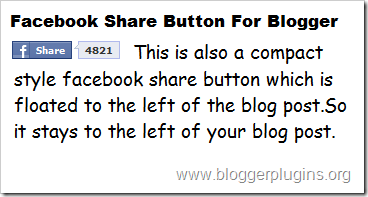
Code for Facebook Share Compact Button Style 2
<div style="float:left;padding:4px;">
<b:if cond='data:post.isFirstPost'>
<script>(function(d){
  var js, id = 'facebook-jssdk'; if (d.getElementById(id)) {return;}
  js = d.createElement('script'); js.id = id; js.async = true;
  js.src = "//connect.facebook.net/en_US/all.js#xfbml=1";
  d.getElementsByTagName('head')[0].appendChild(js);
}(document));</script>
</b:if>
<fb:share expr:href='data:post.url' type='button_count'/>
</div>
How to install Facebook Share Count Button on your Blogger Blog?
1.Select one of the Share Button Styles and copy the Corresponding Code.
2.Now login to your Blogger Dashboard and navigate to Layout > Edit Html and check the check box which says “Expand widget templates”
3.Find this piece of code
and immediately after that place our Facebook share button code(that you copied) If you were unable to find this code in your template,then look for the first occurrence of
<data:post.body/>
and immediately before that paste our Facebook Share button code(that you copied).
4.Next you have to add the fb namespace to your template tag.Your template should have the specification for the fb tag that you have used. The following namespace declaration will take care of that. To declare the namespace, find
<html
and change it to
<html xmlns:fb="https://www.facebook.com/2008/fbml"
The following screenshot will help you out.
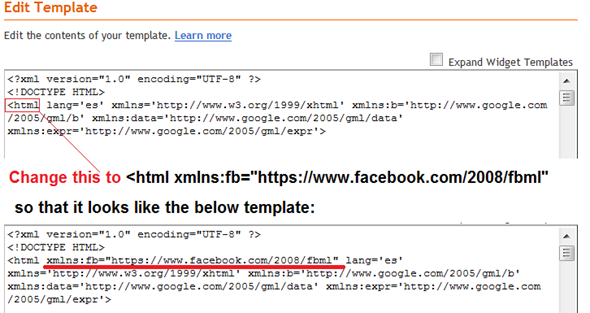 This is necessary for all FBML widgets using the fb tag. So if you have already added the namespace while adding some other FB plugin, then you can skip this.
5. Save the template and you should get a Facebook share count button near each of your blog post
If you liked this post and if it helped you in implementing the Facebook buttons, then please consider sharing this post on Facebook using the button on the top-right of the post :)
Also Check out :
Permalink :Facebook Share Count Buttons for Blogger
Wow that's a very good news Aneesh.
ReplyDeleteBy the way, the intergration of Adsense in this page is just perfet, well done Aneesh.
Great Aneesh Nice to know about the Facebook share count widget for blogger
ReplyDeletethats cool! I knew how to put a facebook add as a friend button but this is new for me. Thnx for the know-how
ReplyDelete@aneesh how are you implementing adsense ads in between posts.Adding them manually or just using hack to show only adsense tag to them in between post and the adsense codes are defined in html and adds appear automatically there.
ReplyDelete@Anshul added manually with line breaks turned off
ReplyDeleteThank's
ReplyDeletethanks for posting a nice tricks
ReplyDeleteHow did you make the facebook button come above the twitter button? When I followed the instructions given, They were side by side.
ReplyDeleteThanks, btw. It really is a useful addition to my page :)
thank aneesh... i will try it into my blog
ReplyDelete@Sameh Khan
ReplyDeletetake the codes from this post and remove the opening and closing divs. Now insert this code in the div containing the retweet code..
I thought this was a facebook fan counter..Still waiting for that to come out.
ReplyDeleteJust what I wanted! Thanks, it was easy.
ReplyDeleteI was looking for this for along time thanks for this.
ReplyDeletehey can u tell me how to set comment count on right top corner as in your all post i.e, in Facebook share count has 14, with my its 15, create a facebook.. has 10 comment (show in right top corner of post). it looks nice
ReplyDeletehow to set this pls pls
pls mail me at sandippatel1110@gmail.com
thanks in advance
When you make new post dude? we waiting ;)
ReplyDeleteThanks for letting me know about this. I didn't know that a button like this was even possible.
ReplyDeleteHey thanks
ReplyDeleteby using your tutorial i have made my site beautiful
now i want you to help me out
in my site homepage, photo seen in squarebox, is there any way to make this square little bit bigger (456 px *650 px or >than this), so photo will be seen clearly and big enough
here is my site : http://tinymoviez.blogspot.com/
do help fast cause i want to develop my blog
Thanks in advance
pls do help me.
Thanks for sharing such nice information about facebook buttons. You described it very beautifully.
ReplyDeleteHi,
ReplyDeletevery nice blog, thank you!
Is there a way to include in the "a href" tag the Google Analytics parameters to track click events on these buttons?
Thanx in advance
hey see my site i implemented it but its just showing the button not the count it shows count once button is clicked...
ReplyDeleteplease gimme a solution...
sorry forgot.... this is my site gimme a solution plz
ReplyDeletehttp://therapidsharelinksworld.blogspot.com/
@-=KSK= count will be shown only after the postgets shared 2-3 times
ReplyDeleteThank You for sharing...
ReplyDeletein my blog template didn't Show.. it this why?
ReplyDeletehttp://www.mukhtar.web.id
I have done this on my blog but It does not seems to work properly?
ReplyDeletei'm new to this blog and i enjoyed reading your informative posts..
ReplyDeletei try to install coe facebook share count buttons for blogger style 1 on my blog, why ? no way, is there something wrong or did not support with my blog template please help. thanks
ReplyDeleteNice one greta post I would like to add this to my site here buttonshut.com in the facebook buttons section so that my users can share this on facebook.
ReplyDeleteHi Aneesh why aren't you updating your blog.I am waiting for your next great post.
ReplyDeleteI WANT TO DELETE TEXT BLOGGERTRICKS.COM AT MY BLOG HEADER & I WANT TO REPLACE WITH MY BLOG BANNER OR LOGO. FOR YOUR INFORMATION,MY BLOG IN XML FILE.CAN U TEACH ME HOW?U CAN VISIT MY BLOG IF U WANT TO SEE CLEAR.I TRY MANY TIME BUT ALSO CANNOT,PLEASE...
ReplyDeleteThanks for this help and guidance, this is my first visit to your site and it is great, to read how to add code in a simple and easy way l will return and let you know my feed-back.Also will add link to my blogger network.
ReplyDeleteKindest regards, Ian
Cool, i like this :) Thank you Aneesh
ReplyDelete@Daily Mobile ,@Blogging Tips
ReplyDeletei am busy with my studies.. will be back soon :)
@Ian Draper
thanks :)
hi aneesh.. i like this blog and tutorial.. visit my blog from indonesia. keep blogging thanks aneesh..
ReplyDeleteWhere did you find all the info you have! You are a pro! thanks for sharing. Certainly you do serious research! Thanks again!
ReplyDeleteHi Aneesh,
ReplyDeleteI tried to put the "Facebook Share Button Style 1" on my blog here: http://positivelynigeria.blogspot.com but for some reason the "count square" is not visible...it only shows the "f share" button.
Please help. Thanks.
Facebook is a great source of traffic. Awesome post dude, written in simple english
ReplyDeleteWe need New post mate!
ReplyDeleteGood job...thank you!
ReplyDeleteHi, Aneesh it is your another fine work. But when I try for my blog, I get an error message " Your template could not be parsed as it is not well-formed. Please make sure all XML elements are closed properly.
ReplyDeleteXML error message: The reference to entity "alt" must end with the ';' delimiter." Please suggest the solution.
http://catswatch.blogspot.com
Awesome..this is very helpful, thanks
ReplyDeleteThanx for sharing.... :)
ReplyDeletehi, it worked but when sharing the content being shared is the 'about me' stuff not the post itself...
ReplyDeletehttP://scorpwriters.blogspot.com
THANKS FOR THE TIPS!
ReplyDeletewrite you a new post this year? ; /
ReplyDelete"Perhaps you can write to me"
ReplyDeleteT.S.Elliot
great posting, thank's for sharing
ReplyDeletevery nice widget....
ReplyDeleteThanks for this great post.
ReplyDeleteI have a question on "How can we display codes like these in our blogger blog?"
pls i want to know it
thanks..
ReplyDeletethis great posting
It helps, thanks for this article sharing great idea.
ReplyDeletethanks man ;)
ReplyDeleteThanks so much! I've been looking for this for a LONG time, and it worked on the very first try. Rock on!
ReplyDeletegood news for me..take care . . .visit me back...
ReplyDeletewooow Thanks, thank you very much.... :)
ReplyDeleteIf you're using Blogger, I put it into my Blogs Setting> Formatting> Post Template
ReplyDeleteI am tempted to see if there is a more up to date version of this that I'm just not seeing but we'll see. I'm sort of out of paitience with these Widgets right now.
Since with the new Blogger Templates, I couldn't get either code to show up in my template. So I put the smallest share button in my Post Template under Setting> Formating.
ReplyDeleteThanks for the tips
ReplyDeleteIt works.. Thanks :)
ReplyDeleteHi.. I was wondering if you can aLso help me.. I use wordpress for my blog.. I would like to include this button also..
ReplyDelete@Venexea ,cronicknitter
ReplyDeletethere is a problem with inserting the code into the post template.
That share button shares the current page being viewed in the browser and not the post. So on the home page the buttons on all posts share the homepage and not the individual post pages.
Adding the code to the template will create separate share buttons for each post.
you can verify it by seein the homepage of Venexea's blog.
Thank you the facebook button works great and makes it much easier to share my posts.
ReplyDeleteMike
Can you give me advice here pls? I've got this blog http://cheap-i-m-ebooks.blogspot.com/, and there I have 3 buttons IN LINE under each blog post title on the right side of the blogpost.
ReplyDeleteI want them NOT to be IN LINE but IN COLUMN, UNDER each other. Do you know how can I do that in HTML??? Or is it possible at all?
this site is very helpful..tks a lo
ReplyDeletewell done
ReplyDeletehello!!!
ReplyDeleteI really wanted to have it on my Blogger (since it's easier for Wordpress)
I'm so happy, now I feel complete :)
thanks (the same for retweets button )
Thanks!! Just the way i wanted it.
ReplyDeleteThanks Aneesh !! However I need a help i have succesfully add the Facebook share button, however I am unable to see the count. Here is one of my post which share with friends regarding the TOp 100 science blogs.
ReplyDeleteHelp me - Here is the link of post - http://www.scientiamag.com/2010/02/eurekas-top-100-science-blogs.html
Any idea, please let me know
@Swamykant - as i have said in my earlier comments, the counter doesn't show small counts. I think the minimum count that it would show up is 3 or 4. Wont show the count for 0,1 or 2 shares.
ReplyDeleteWhy it always minimize. Is there any trick so it remain open.
ReplyDeletehttp://www.wallpaperspub.net/
thanks and sorry my english dos,nt help me to thank you much
ReplyDeleteyour very good my name is mahmoud
How do you get the Facebook share to have correctly pre-populated title, description, and image fields? Your blog actually puts the title of the post into the facebook share title instead of the title of your blog, this is really nice, how did you do it?
ReplyDeleteIt is a real educating blog for bloggers like me who are new to the blogging. I have tried many widgets in side bar and at the top of the post but putting in through or within blog post I learnt from your blog. Thanks a lot! God Bless You!
ReplyDeleteHi,
ReplyDeleteI added this to my site (www.amisampath.com) but it doesn't pick a thumbnail image when sharing on Facebook. Only the page title and URL is picked.
Please give me som hints
@Amitha - dont know why. it used to work earlier now the images uploaded via blogger doesnt show up as thumbnails. If image codes for external images are added to the post, thn it show up. Check out my latest post on Google buzz and click the share button, you can see that it takes up the thumbnail. that image is hosted on tinypic. None of the other images come up. Hope that they would get it fixed.
ReplyDeleteI can't get this to work on my blog. Please help???
ReplyDeleteFirst it will show share count but. it will automatically disappears. when I re visit my page. Why this is happening??
ReplyDeleteHey Aneesh this counter really doesn't works. Why? It will disappears when I refresh the page...
ReplyDelete@Anup - as i have said earlier in comments, the counter wont show small counts like 1 or 2. It will show the count if the post is shared more number of times.
ReplyDeleteOh! got it. thanks for the quick reply Aneesh :)
ReplyDeleteOh I have got it with my great thanks and pleasure
ReplyDeletethanks alot for this info
ReplyDeleteThanks a lot anneesh. After visiting over a dozen sites, it was yours that was finally helpful!
ReplyDeleteThanks But i have a Problem .. The count bubble is missing eventhough there is some count. Please help me.
ReplyDeleteHere is my blog - http://www.scientiamag.com/
Hi Aneesh,
ReplyDeleteThanks so much for this tool. I wonder if you can help me with a simple trick related to this. I can see that when I share your page on facebook, the first paragraph shows up as a meta description. When I share any pages from mine (www.howdoigetto.blogspot.com), the global meta description shows up. Can you help me tweak this?
Can it be done by adding a code to my template? Thanks!
Reply to last comment by me:
ReplyDeleteIt worked. Thanks for the tutorial.
nice info, thank's
ReplyDeleteBeautiful, thank you. That was so easy
ReplyDeleteThank you so much for giving us these such crystal clear steps. I installed it on my blog and it is working fine.
ReplyDeleteThank you again!
www.beontheroad.com
How about another question? I think your post almost answers what i'm trying to do, but i'm not a programmer just trying to find some data to present to my programmer for implementation. I'd like to include a within the footer of my website a "facebook fan count". I believe this will add an incentive to users considering clicking our facebook icon. "join XXXX fans on our facebook page" for example. I want the XXXX to be automatically populated with our facebook fan count. I want to do the same with twitter. Any insight you can provide would be helpful.
ReplyDeleteThanks
@Anonymous - This post is not related to what you are asking but it can be done using the Facebook and Twitter APIs. Refer this link
ReplyDeleteHi Aneesh - not sure if you saw my comment above but would just want to post it again. I hope you can help me:
ReplyDeleteThanks so much for this tool. I wonder if you can help me with a simple trick related to this. I can see that when I share your page on facebook, the first paragraph shows up as a meta description. When I share any pages from mine (www.howdoigetto.blogspot.com), the global meta description shows up. Can you help me tweak this?
Can it be done by adding a code to my template? Thanks!
Thanks Aneesh, I wonder why I wasnt able to see this post of yours while going through your site. I shall try this:)
ReplyDeleteThanks so much. it is very helpful
ReplyDeleteI put this in my blog and it works great. However, when I click on the icon to share on facebook, it is not pulling up my description or the images. I share each post on FB and need this to work. Can you look at my html and tell me what is going wrong? http://adhdmomma.blogspot.com I did look at the link you last posted in these comments and pasted it in but it didn't change anything.
ReplyDeleteThank you very much for your help. I have installed facebook share button into my blog which I could not through http://www.facebook.com/note.php?note_id=149643928371 as it has suggested to paste the code somewhere in different place.
ReplyDeletereally nice article and easy to understand .. Really big thanks.
ReplyDeleteThe button works, with one exception: It doesn't display the number of times people have shared. I tried pressing the button on three or four blogger blogs besides my own. Same problem on all of them.
ReplyDelete@Necessary Distractions - count will be shown only after the post gets shared 3 or more times(so it wont show counts like 0 1 or 2)
ReplyDeleteHi Aneesh, just a quick question. I just got a custom domain and noticed that the number of facebook shares went back to zero. Is it the case or will it get updated in the next few hours? Thanks!
ReplyDelete@Going anywhere in Metro Manila - it wont get updated. The urls have changed. so the sahre counts will start again from zero.
ReplyDelete@Aneesh. Of course, I see someone has commented on that already. Sorry about that. Should have read the the comments more thoroughly :P.
ReplyDeletePS. I'd love to see a tutorial on how to implement the new faceebook "Like" button on blogger. I tried to put it on my blog today, but I didn't quite succeed. :(.
@Necessary Distractions - Tutorial on adding the Facebook "Like" Button on Blogger - http://www.bloggerplugins.org/2010/04/facebook-like-button-for-blogger.html
ReplyDeleteVery Nice Tutorial...
ReplyDeleteGreat work
I was looking for this
Thanks
http://www.urdusms88.blogspot.com
Thanks so much it worked great :)
ReplyDeleteI even managed to place it on the right side instead of the left side!
Such a good explanation.THANKS
How to i add this in Classic Template?
ReplyDeletethanks a lot blogger plugin....it looks cool. on my blog hacker9.com.
ReplyDeletealso am looking for retwit button here.,,thanks
Thnx a lot. Will you please tell me how to add share it at the end of the post. My e mail ID is vishkumawat93@gmail.com.
ReplyDeleteAnd my blog is http://blogginggallery.blogspot.com/
Thanks for post I tried this but it's not working for me it's mess up even I'm not using div .. I just use script code. please advice
ReplyDeleteNice :)
ReplyDeleteVisit mine , I've implimented it..
www.tricksterminal.com
But its not showing in the blog's main page =((
And its coming under d footer :((
@ D Post Creator!
ReplyDeleteAny help on dat?
Please reply?
My Blog Link: www.tricksterminal.com
d FB Share is not coming in the Main Page!! :(
HELP!
thanks man.. atlast its working .. But d template i use is not allowing me to keep it in the top..
ReplyDeletethe posts comes a little below it :(
Anyways, thanks! :)
www.tricksterminal.com <-- Dont forget to check! :)
Thanks man, this is the easiest way I've ever done something like this, your instructions are short but precise and clear.
ReplyDeleteAgain thanks.
We added this like button but it doesn't show how many shares has been happend till now. i can see the same problem at your article. is it a facebook problem?
ReplyDeleteMaybe someone can help me out. thxs in advance
When i share my post from my blog, the image appear in the facebook is different from my website logo, how can my website logo appear as a image when i share my post in facebook??
ReplyDeletePlease suggest
I am so glad that I found your blog. I've been looking for a facebook button for a while now. Thanks for the post.
ReplyDeleteYour the man! Thanks! :D
ReplyDeleteI'm thrilled with this information and have installed both the "Like" and "Share" buttons. Thanks SO MUCH!!!
ReplyDeleteStrange. After clicking the share button, facebook shows as the description, the first comment for the post instead of the actual description of the post. Any ideas?
ReplyDeletethankyou, this is what i'm looking for
ReplyDeletecool i addded this on my blog thanks author..
ReplyDeleteMuch appreciated tips my good sir. Keep up these nifty little posts.
ReplyDeleteI love this! I've properly inserted the button, but when someone posts it on facebook, the summary it's giving is people's comments about the blogspot, not the actual blog. Anyway to fix this? http://bit.ly/bJ7uvB
ReplyDeleteIn my case.. why does it show only the "share" button? and after you click it.. that's the time it only shows the number share count..
ReplyDelete@Jaztien - you need a minimum of 3-4 shares on that post for that to show up automatically :)
ReplyDeleteNo need of b:if ?
ReplyDeleteThanks for sharing this tutorial~~
ReplyDeletethanks a lot working perfect on my blog
ReplyDeletehttp://www.homoeopathyart.blogspot.com
I had try some base on tutorial above but still cant work.
ReplyDeleteWhen i put the code before the seconds of tags :
div class='post-header-line-1'/
And finally worked.
Now you can see in my blog http://tambelan.blogspot.com.
I have a big problem...
ReplyDeleteWhen I put the buttons(for twitter and blogger) you can see in all: 0 tweet. I tweet it and now you can see 1 tweet. BUT WHEN I REFRESH THE WEB, I HAVE 0 TWEET AGAIN!!!
I'm going crazy because of this!!
ANSWER ME PLEASE!!
http://kordream.blogspot.com/
-->nanaoppa@gmail.com
nice post dear
ReplyDeletecouponlk.blogspot.com
wow..its a great tutorial..thanks..
ReplyDeleteThank you...
ReplyDeleteThis article very help me :)
Is there a way to create an iframe version of this share button? I want it to appear only after you click the post title.
ReplyDeleteI can't put the button in a top left of the post. :(
ReplyDeletethanks...it really help me...i used it for my blogs...but can i know how to make sitemap for my blog..
ReplyDeleteThank you!!! very useful information!! I'll use it.
ReplyDeleteThank you so much for your article. It's very useful for me! Keep going on, Aneesh
ReplyDeleteThank you very much for this post! Thanks to you my site looks more and more professional and the social media usage is increasing :)
ReplyDeleteHave an amazing day! :)
thanx on the tips
ReplyDeletenot function
ReplyDeleteHi Aneesh,
ReplyDeleteI wanted to have the Tweet button & the FB share buttons in a column (or at the very least, to be in line w/each other if they have to be side by side), but I can't seem to get this to work, even w/your previous suggestion to remove the div tags. Is there any way to have both buttons display in a single column that is actually aligned?
Thanks!
yo.your christmas widget makes the whole thing slow man...
ReplyDeletethx man,i try and it works greats.thx a lot for this greatest info.
ReplyDeleteDear friend,
ReplyDeleteAs my website is an image providing site,i would like to add a share button for every picture in my blog.
can you help me to create such a button code ?
ok, it's good, thanks for sharing
ReplyDeleteThanks my friend, This button very nice in my blog..
ReplyDeleteThanks! this really helped :)
ReplyDeleteThanks For Sharing This Share Button
ReplyDeleteWhy This Button Not Valid HTML5 ?
Hello aneesh.
ReplyDeleteI've enabled this code to work.but my i ask if how can i apply the retweet,fb share,google buzz etc etc.. to line horizontally because it's eatin' up the space in my blog post header and one more thing,why is that google buzz and fb share are the only one's showing in the teaser post,the the others are not?ope you can help me.thanks and keep it up^_^
thanks, this article helps me a lot.
ReplyDeleteHi, Aneesh, I am trying to drop this bit of code into my blog, however I keep getting an error message. Please assist. Is there something I'm missing? Will certain blogger templates not allow for the share button
ReplyDeleteHi, thanks for this info. but have really got a problem and will please need your assistance, i got to realise that when i or somebody likes or share a post from my blog, it only shows d title of my blog, it doesn't show the post title as before.. Please help me
ReplyDeletehere's my blog url www.trueinternetworld.blogspot.com
Thanks Aneesh.It helps me a lot.
ReplyDeletemade it... success... thanks...
ReplyDeleteI just got around to adding this button. Thanks for making it so easy.
ReplyDeletewow,
ReplyDeletei like it
i like it
ReplyDeletenice post
It's a bit strange: I added this share count button to my posts and it's displayed as it should be, however no one can click on it to share - like it was just an image, not a link.
ReplyDeleteHi Aneesh,
ReplyDeletethis works for me and able to post to the facebook.
when it is posted on FB, title of the link is Alok\ not the title of the post.
You can try and see the effect, I am not able to debug it hence coming to you for help.
My blog is
alokchoudhary.blogspot.com
Kindly help me
waiting to hear from you.
uhm, I already have a like button on the side of the blog and I tried adding this code to have a share button on my posts. But what happened was that the share button appeared but my like button didn't load anymore. What happened?
ReplyDeletejust what i wanted;]
ReplyDeletethank you...
ReplyDeletenice great tnxxxxxxxxx
ReplyDeleteHi, but this doesnt appear well in my blog after following the steps, can you figure out why??
ReplyDeleteoh btw, this is my blog link:www.encikazman.blogspot.com
ReplyDeletevery usefully post thanks
ReplyDeleteThank you...
ReplyDeleteit work...thanks
ReplyDeleteThank you! Thank you very much! This is what i am looking for.
ReplyDeleteI don't work anymore. First I thought it was my mistake but it's the same on this page. It doesn't show anymore how many times something is shared ...
ReplyDeleteNo share button's count showing.
ReplyDeleteAs of July 27, 2011 the Share Button count is no longer showing on my blog. I have had the count for years, now it's gone. I have noticed on other blogs that the counts are no longer there. What changes have been made by Facebook that the count is no longer there? What good is it to the blogger if you have no idea what the count is?
ReplyDelete@Anonymous - post updated with solution :)
ReplyDeleteStill doesn't work me. I tried the solution but when I replace <a expr:share_url with the code you said I don't see the share box anymore. Only thing I see then is that other code.
ReplyDeleteI really don't know what i'm doing wrong.
Thanks Blogger Plugins for the Update! This is the same Anon as above regarding July 27, 2011. Little issue though. What happened to the Dashboard? Seems as Blogger Design has went through a major change.
ReplyDeleteFor the life of me I can no longer find where to make revisions to my template html. Thank you any assistance. The new layout is no where near as user-friendly as the old one. Thanks again for the update!!
Blogger Plugins... This is anon again. Found out there is no Edit HTML button anymore for Blogger but I have found a way around it.
ReplyDeleteThe blogger needs to add their Blogger ID at the end of the following:
http://draft.blogger.com/html?blogID=
Then the old edit html page appears!
Thanks for this page!
nope.. its still not working.. didnt show the count.. i follow all ur step, change the old one to new one, but its still not show the count..
ReplyDeleteSorry Blogger Plugins its ANON again! I have tried now for hours, step by step. Here are my lines directly from my template:
ReplyDelete( I tried to send you lines from my template, but your comment box would not allow )
Not only does the count not show after the steps, but the Facebook button doesn't either. When I added the line before head the Facebook button was still there, but when I exchanged the line that starts with <a expr:share_url with the replacement line, the Facebook button was no longer there, and after deleting the javascript line it still wasn't there. Any further ideas!! I have tried every variation of steps with no luck. Thank you for any help!
@Anon and others - i think you might have missed step 5. That script should be included to render FBML markup.
ReplyDeleteSame with me, it didn't work though I followed all the steps, step by step :(
ReplyDeleteAnon again! The fifth step actually was the only step that I left in. When I performed the next step, replacing the line, is when the box disappeared, then when I removed the javascipt line, still no box.
ReplyDeleteAll that said, Good News.. The count is back today 08/03/2011!!
Facebook must have made repairs!
Thanks Blogger Plugins for your assistance on this.
this is great man keep it up
ReplyDeletewhen I click on the icon to share on facebook, it is not pulling up my description or the images. I share each post on FB and need this to work.
ReplyDeletei have the same problem.When i share it on facebook it show blog name link for that page and blog description.Thumbnail however shows.But i want to be seen post title and post description.How to do this ? Thx
ReplyDeleteThanks for this tutorial.... awesome!!
ReplyDeletedidn't work for my template.. :'(
ReplyDeletethanks for this tutorials! cool!
ReplyDeleteI got this one Thank you so much
ReplyDeleteLove it. I fear HTML, but this is so easy to follow
ReplyDeleteThanks dear i m trying to install but tempelete error... :(
ReplyDeleteSee in my blog... http://bloggingsworld.blogspot.com/
that work for my blog...thanks for share it
ReplyDeletereally works!! cool!! thank you very much
ReplyDeleteit didn't work on dynamic view
ReplyDelete